 Storytella
Storyboard to Animatic AI: From Static Frames to Moving Pre-Vis
How animatic AI turns your storyboard panels into moving pre-vis you can actually feel — pacing, timing, and camera work, all before a single shot is filmed.
If you've ever stared at a finished storyboard and tried to feel the pacing of a scene, you already know the gap that animatic AI is closing. Static panels show composition, but they can't show timing, transitions, or the emotional weight of a beat as it unfolds in real time. An AI animatic does. In this guide, you'll learn what animatic AI is, how it converts storyboards into moving pre-vis, and how to use it to lock pacing and camera work before you shoot a single frame. You can do this end-to-end inside Storytella.ai, without a pre-vis artist or animation team.
What Is Animatic AI?
Animatic AI is a category of tools that take storyboard panels — drawn, sketched, or AI-generated — and turn them into moving sequences with timing, camera motion, and rough audio. Instead of a stack of static frames, you get a watchable rough cut that runs at the actual pace of your scene.
The output isn't a final film. It's pre-visualization: low-fidelity, fast to iterate on, and good enough to make real creative decisions. Directors use animatics to catch pacing problems before they're expensive. Editors use them to test cuts before footage exists. With animatic AI, that step now takes hours instead of weeks.
Storyboard vs. Animatic vs. Pre-Vis: The Quick Difference
These terms get used interchangeably, but they're not the same thing.
| Format | What It Is | What It's For |
|---|---|---|
| Storyboard | Static panels showing composition shot by shot | Locking framing and shot order |
| Animatic | Storyboard panels edited with timing, basic motion, and rough audio | Locking pacing, rhythm, and edit |
| Pre-vis | 3D or AI-generated rough footage of full scenes | Locking blocking, camera moves, and feel |
An animatic sits in the middle. It's more time-accurate than a storyboard but lighter than full pre-vis. Animatic AI tools blur the line — when an AI generates moving footage from your panels, you're often getting something closer to pre-vis than a traditional animatic, with the speed of the former and the depth of the latter.
Why Filmmakers Are Moving from Static Boards to AI Animatics
The shift isn't about technology for its own sake. It's about catching the problems static boards can't show you.
You can feel the pacing. A two-second beat looks the same on paper as a six-second beat. In an animatic, the difference is obvious — and often the difference between a scene that works and one that drags.
You can test cuts cheaply. Re-ordering panels in a doc is one thing. Watching three different edits of the same scene in a row is another. AI animatics let you cut, re-cut, and compare without rebuilding anything.
You can communicate the vision. Sending a storyboard to a collaborator means hoping they read it the way you intended. Sending a one-minute animatic removes the ambiguity. Editors, DPs, and actors all respond differently when they can watch the scene instead of imagine it.
You can iterate before you commit. The cheapest scene to fix is the one you haven't shot yet. Animatic AI pulls that fix point earlier in the process, where changes cost minutes instead of days.
How AI Turns a Storyboard into an Animatic
Under the hood, animatic AI does a few specific things to convert static panels into a moving sequence.
1. Scene understanding. The AI reads each panel (or the prompt that describes it) and identifies the subject, setting, and action. This is what lets the same character look like the same character across panels.
2. Motion synthesis. Instead of treating each panel as a fixed image, the AI generates inter-frame motion — characters move, cameras drift, environments breathe. The result is footage rather than a slideshow.
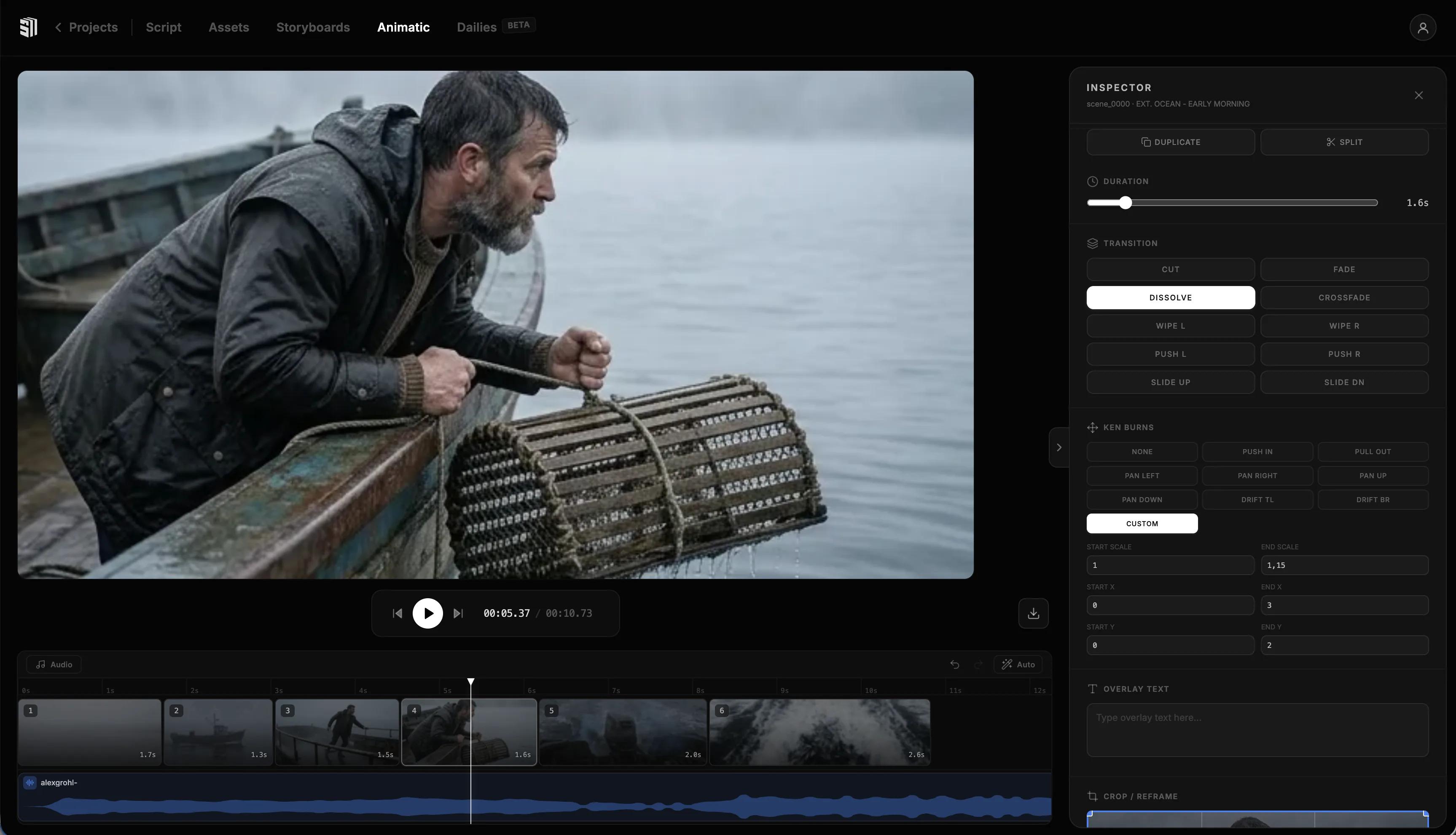
3. Timing and sequencing. The AI lines up the generated shots on a timeline with adjustable durations, so you can stretch or compress beats until the rhythm feels right.
4. Audio scaffolding. Many tools add temp music, sound effects, or even AI voiceover from your script so the animatic plays as a full scene, not just visuals.
The best animatic AI tools handle all four steps in one workflow, so you're not exporting panels into one app, generating motion in another, and editing somewhere else. End-to-end matters here — every handoff is a place where character looks change, style drifts, or timing breaks.
What to Look for in an Animatic AI Tool
Not every tool that calls itself animatic AI is doing the same job. When you're comparing options, these are the criteria that actually matter for a finished animatic.
Character consistency. If your protagonist's face changes between shots, you don't have an animatic — you have a slideshow of strangers. Look for tools that lock character appearance across the whole sequence.
Style control. A noir thriller and a kids' adventure shouldn't look like the same generator made them. The tool should let you apply a consistent visual style across every scene.
Scene-level editing. You'll want to regenerate one shot without breaking the others, adjust timing per beat, and swap dialogue without redoing the visuals. Tools that treat scenes as discrete, editable units win here.
End-to-end workflow. Script in, animatic out, in one place. Every export-and-reimport step costs you consistency and time.
Iteration speed. The whole value of an animatic is being able to try things. If each regeneration takes 20 minutes, you'll iterate less and the animatic gets weaker.
Storytella.ai was built around this exact list — character consistency, style control, scene-level editing, and a unified script-to-cut workflow — which is why it works as an animatic generator even though most people use it for full productions.
Step-by-Step: Building Your First AI Animatic
Here's the workflow most filmmakers use to get from a storyboard to a watchable animatic in under an hour.
Step 1: Start with a tight script or beat sheet. The AI is only as good as the brief. Two lines per scene — action and intent — is enough.
Step 2: Define your characters and style upfront. Lock the look of your leads and the overall visual style before generating any scenes. Doing this first prevents drift later.
Step 3: Generate scenes one at a time. Don't batch the whole script in one go. Generate a scene, watch it, refine the prompt, regenerate if needed. Move on once it's close enough.
Step 4: Drop the scenes onto a timeline. Order them in script sequence and trim each clip to roughly the duration the beat wants.
Step 5: Watch it as a sequence, not as shots. This is where pacing problems jump out. The shot that feels great alone often runs too long in context.
Step 6: Add temp audio. Music and dialogue change everything about how an animatic reads. Even rough AI voiceover is better than silence.
Step 7: Iterate, then lock. Cut, re-cut, regenerate the shots that don't land. When the animatic feels like the scene you want to shoot, you're done.
Common Mistakes When Generating AI Animatics
These are the ones that quietly waste hours.
Treating it like a finished film. An animatic isn't supposed to look final. Polishing one shot for an hour means you'll never finish the sequence. Get the rough cut first, refine later — if at all.
Skipping the timing pass. Generating beautiful shots without ever watching them in sequence is the most common animatic mistake. The whole point is the pacing.
Inconsistent character look. If you don't lock your character early, every shot becomes a new audition. Decide the look once, then reuse it.
Generating without a script. AI animatics fall apart when there's no clear beat sheet. The tool can't infer your story.
Ignoring audio. Watching an animatic in silence makes pacing harder to judge. Even a thirty-second temp track tells you whether the rhythm works.
FAQ
How long should an AI animatic be?
It should be exactly as long as the scene you're testing. For a single dialogue scene, that's often 60–120 seconds. For a full sequence, three to five minutes. Don't pad — the animatic exists to test pacing, so artificial length defeats the point.
Can I use animatic AI without drawing storyboards first?
Yes. Most modern tools can generate scenes directly from a script or beat sheet, skipping the drawing step entirely. If you're a writer-director who doesn't sketch, you can go straight from script to animatic.
Is an AI animatic good enough to show producers or investors?
Often, yes — with the right framing. An animatic shows the vision and pacing without pretending to be the final film. Sharing it with the words "this is pre-visualization" sets the right expectation and lets the work speak for itself.
How does animatic AI handle dialogue scenes?
Most tools generate per-shot visuals and let you add temp AI voiceover or your own recorded dialogue on the timeline. Lip-sync quality is improving fast but still varies — for animatics, rough sync is usually fine.
What's the difference between animatic AI and a full AI film tool?
An animatic AI focuses on pre-visualization: rough, fast, iteration-friendly. A full AI film tool — like Storytella.ai — covers the whole pipeline from script to final cut, with the same scenes you generated for your animatic carrying through to production fidelity. The line between the two is getting thinner every year.
Do I need any animation experience to use animatic AI?
No. The tools are designed for filmmakers and writers, not animators. If you can describe a scene in plain language and arrange clips on a timeline, you can build an AI animatic.
Conclusion
A storyboard tells you what your scene will look like. An animatic tells you what it will feel like. The gap between those two things is where most films find — or lose — their pacing, and animatic AI is the fastest way to close it.
The workflow is simple. Start with a clear script. Lock your characters and style. Generate scenes one at a time, drop them on a timeline, watch the sequence, refine the timing. By the time you're done, you'll have caught problems that would have cost days on set, and you'll have a pre-vis you can actually share with collaborators.
Try Storytella.ai and turn your storyboard into a moving animatic in one workspace — script to scenes to timeline, no animation team required.
Your story awaits
The set is ready for you.
Turn your screenplay into stunning storyboards and animatics in minutes — not months. No drawing skills required.
Free to start · No credit card required · Cancel anytime