 Storytella

How to Write a Screenplay an AI Can Actually Storyboard
A practical screenwriting guide for filmmakers using AI — seven small format changes that turn vague scenes into storyboards that finally match your script.
You wrote the scene. You ran it through an AI video tool. The character looks different. The location is wrong. The mood is off. You blame the AI — but the issue is upstream. Standard screenplay format was built for a human crew, not a generative model. The good news: a few small changes to how you write description, slug lines, and character intros are enough to get scenes that actually match your script.
This guide walks through the screenplay format for AI: what to keep from traditional formatting, what to drop, and what to add so your script is ready to be storyboarded. By the end, you'll be able to write a scene and trust what comes back. You can do the whole thing inside Storytella.ai, but the rules apply no matter which tool you use.
Why Standard Screenplay Format Trips Up AI
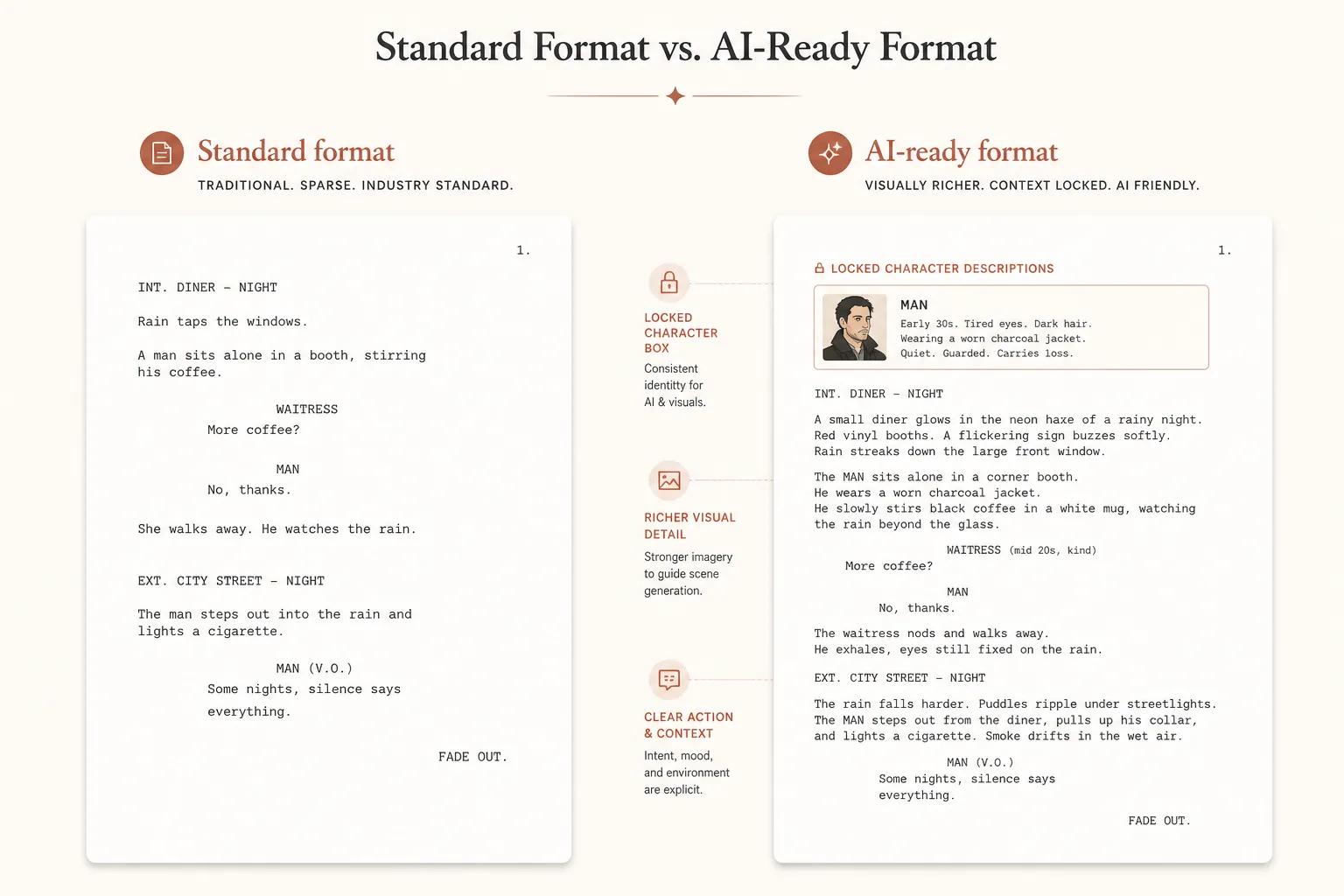
Traditional screenplays are written for a director, a DP, and a production designer. They're a starting point, not a finished spec. A line like "He walks into the bar, defeated" assumes a human will interpret what "defeated" looks like, what the bar looks like, and how the camera should sit.
AI doesn't fill in those gaps the way a crew does. It generates something — but it's the median guess from its training data, not your guess. The fix is to make your script slightly more visual, slightly more literal, and slightly more self-contained per scene. You're still writing a screenplay. You're just writing one that doesn't rely on a future human to translate it.
The Core Idea: Write Description AI Can See
Everything below comes from one principle: AI generates what you describe, not what you imply. If a detail matters to the shot — the character's coat, the rain on the window, the angle of the light — it has to be on the page. If it isn't, the model will pick something for you, and it usually won't be what you wanted.
This doesn't mean writing novelistic prose. It means being deliberate about the visual elements that define each scene. Think of every line of action as a brief to a storyboard artist who will draw exactly what you wrote, no more.
The 7 Rules of Screenplay Format for AI
1. Lock character descriptions up front
Write a one-line visual description for every named character at their first appearance, and reuse the exact same phrasing every time. Hair color, build, defining features, signature wardrobe.
MAYA (28), tall, close-cropped black hair, wearing a faded denim jacket over a white t-shirt.
If Maya appears in scene 4 and scene 22, you reference that same description block. This is the single biggest lever for character consistency across an AI-generated film.
2. Keep slug lines visual
A traditional slug line tells you where and when. For AI, push it slightly further to give the model an anchor.
Standard: INT. APARTMENT - NIGHT
AI-ready: INT. SMALL CITY APARTMENT, WARM TUNGSTEN LAMPS, RAIN ON WINDOWS - NIGHT
You're not rewriting the format. You're adding the two or three details that lock the look of the room.
3. Write action in concrete visuals
Replace abstract verbs with what the camera would see.
Weak: He's nervous.
Better: His hand shakes as he sets the coffee cup down. He glances at the door.
You're not stripping out emotion — you're showing it. AI can render a shaking hand. It can't render "nervous."
4. Specify camera and mood sparingly but clearly
You don't need shot calls for every line. But once or twice per scene, give the model a frame.
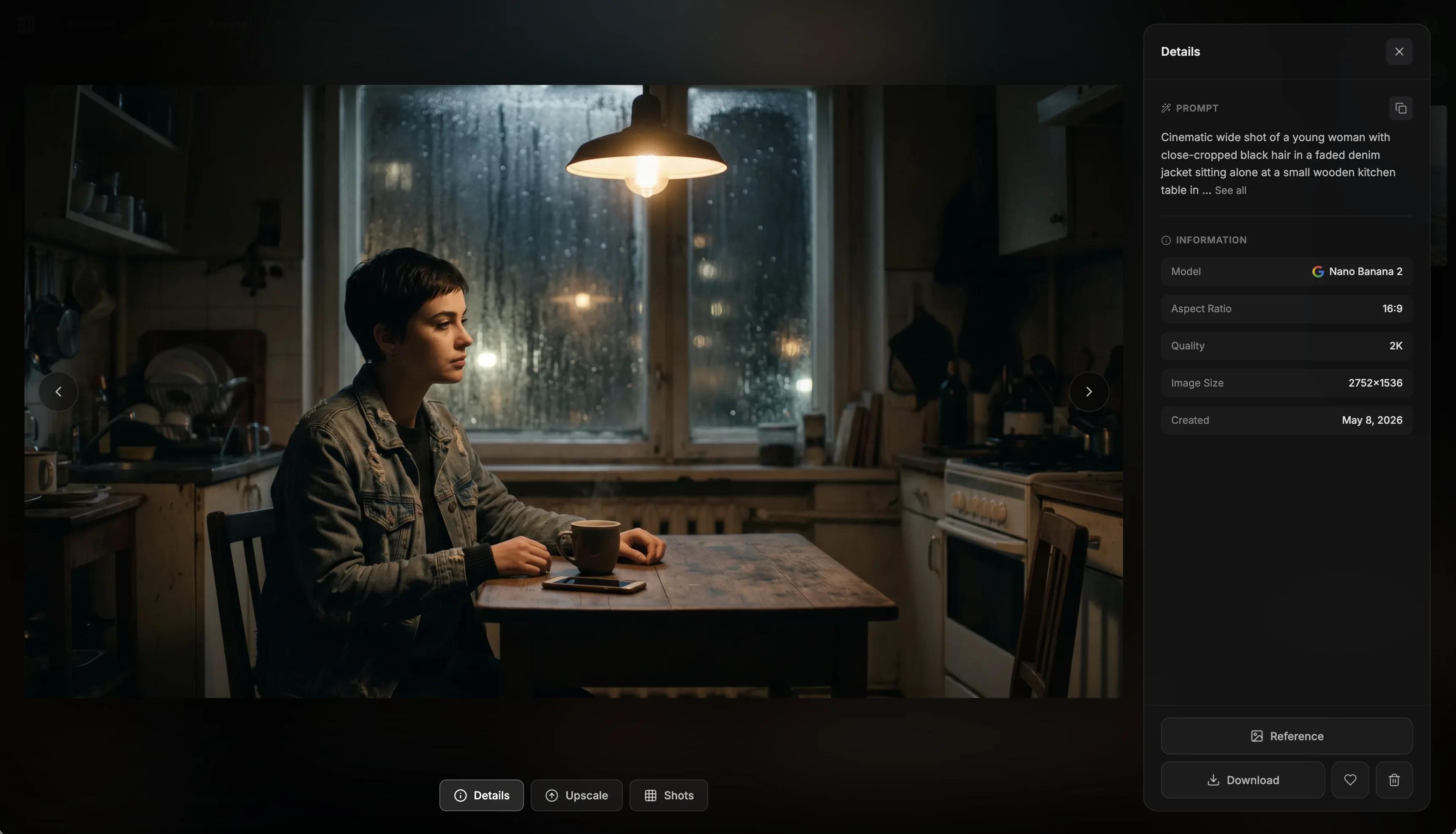
Wide shot. Maya alone at the kitchen table, lit only by the laptop screen.
Three or four words is enough. Reserve them for moments where the framing matters. Use the same vocabulary across the script — "wide shot," "close-up," "over-the-shoulder" — so the model treats them consistently.
5. Treat each scene as a self-contained prompt
The model usually doesn't carry the entire script in context the way a human reader does. So each scene needs to stand on its own. That means:
- Re-anchor the location with a visual slug line
- Re-state who's in the scene by name
- Reference the locked character description if the look is critical
You're not duplicating work. You're making sure scene 14 doesn't lose track of what scene 1 established.
6. Strip internal thought and subtext
Lines like "She remembers the summer in Lisbon" are great for prose. They give AI nothing to render. If the memory matters, write it as a visual cut: a flashback scene, a photograph on the wall, a posture shift. If it doesn't matter visually, cut it.
7. Format dialogue for audio, not inner monologue
Keep dialogue tight, spoken, and free of stage direction inside the dialogue block itself. If a line needs a delivery note, put it in a parenthetical above the line — the way you would in a normal script — but keep the line itself clean.
MAYA
(quiet)
I should have called.
AI voice models read what's on the line. The cleaner the line, the better the read.
A Before-and-After Example
Same scene, two different formats.
Before:
INT. APARTMENT - NIGHT

Maya sits at the table, lost in thought. She's been
through a lot tonight.

She picks up the phone, then puts it down.
After:
INT. SMALL CITY APARTMENT, WARM TUNGSTEN LAMPS, RAIN ON WINDOWS - NIGHT

MAYA (28), tall, close-cropped black hair, faded denim jacket,
sits alone at a small wooden kitchen table. A half-full coffee
mug. Her phone face-down beside it.

Wide shot. The room is mostly dark. Only the lamp above the
table is on.

Her hand moves toward the phone. Stops. Pulls back.
Same beat. The AI version gives a model enough to render the room, the character, and the framing without guessing.
A Quick Checklist Before You Hand the Script Off
| Check | Why it matters |
|---|---|
| Each named character has a one-line visual description on first appearance | Consistent characters across scenes |
| Slug lines include 2–3 visual anchors | Locked look for each location |
| Action lines describe what the camera sees, not what the character thinks | AI can render visuals, not subtext |
| At least one shot call per scene | Gives the model a frame |
| Each scene re-states who's in it and where | Self-contained prompts |
| No metaphors, memories, or internal thought left as raw text | Cuts that don't translate get visualised |
| Dialogue lines are clean — no stage direction inside the line | Better voice generation |
If you can tick all seven, your script is ready.
How Storytella Handles Your Script
A platform like Storytella.ai is built around this kind of script. You paste in scenes, lock your character looks once, and generate consistent visuals across the whole project — no per-scene reprompting. Style choices propagate. Characters stay on-model. You can regenerate a single scene without touching the rest of the film.
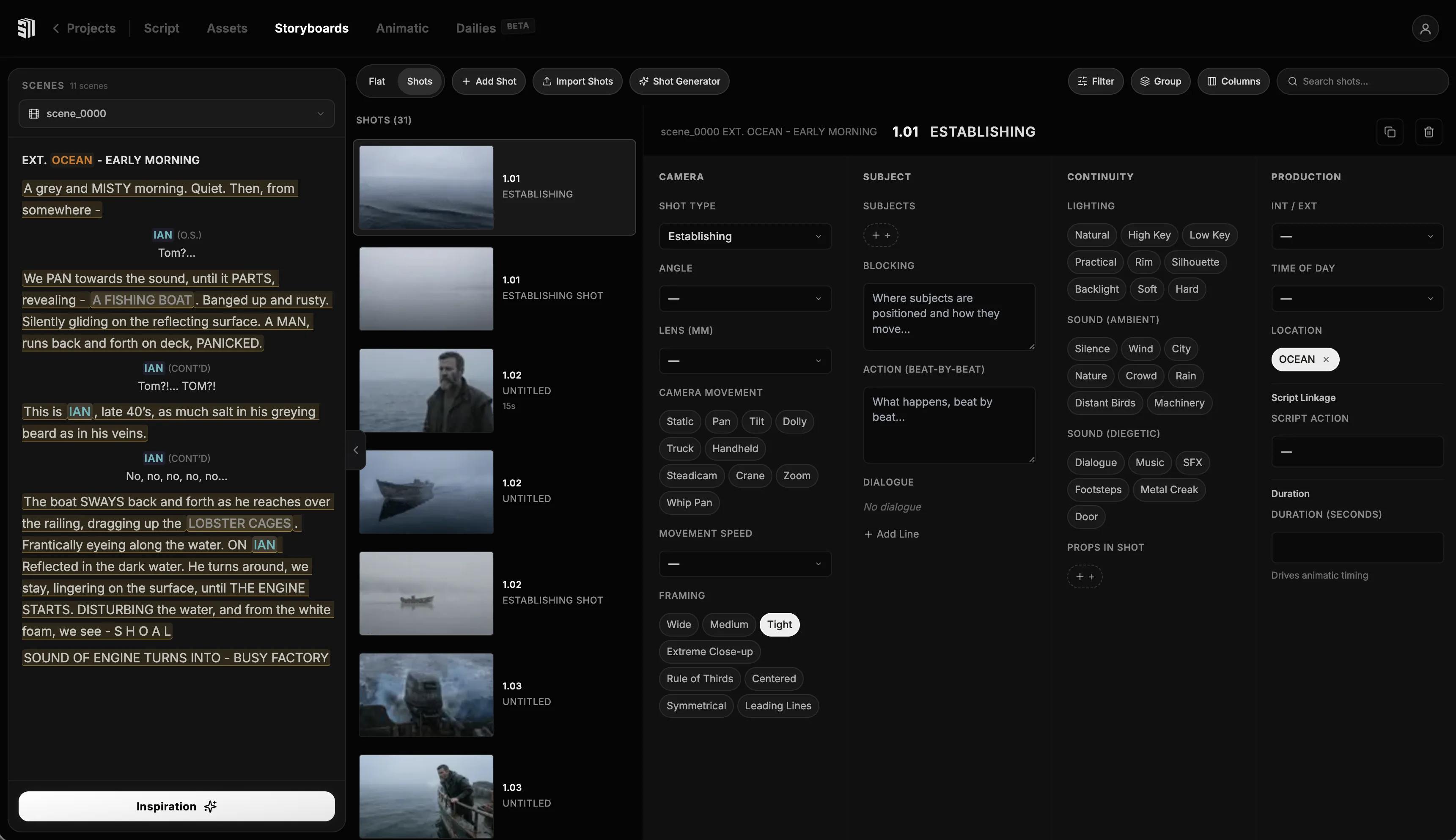
The format above isn't Storytella-specific — it'll improve any AI video pipeline. But it pays off most when the tool is designed to read a full script and treat it as a single production rather than a string of disconnected prompts.
FAQ
Do I have to abandon traditional screenplay format?
No. The format above is still recognizable Final Draft / Fountain-style screenplay. You're adding visual specificity to slug lines and action, locking character descriptions, and stripping subtext that won't render. A human director could still shoot from this script — it'll just also work for AI.
How long should character descriptions be?
One line per character on first appearance is usually enough. Aim for three to five visual elements: age, build, hair, defining feature, signature wardrobe. Anything longer becomes harder to reuse consistently.
What about emotional beats — does AI just ignore them?
It doesn't ignore them, but it can only render them when they're physical. "Sad" doesn't render. A slumped posture, a hand wiping a face, eyes that don't meet the camera — those do. Translate every emotional beat into something visible before you generate.
Should I include camera angles for every line?
No. One or two shot calls per scene is plenty. Reserve them for moments where framing carries the meaning — establishing shots, intimate close-ups, dramatic wides. Calling every angle slows generation down and reduces the model's freedom to find a good frame.
Can AI handle dialogue-heavy scenes?
Yes, especially when dialogue lines are clean and parentheticals are used sparingly for tone. Keep stage direction out of the spoken line itself. If you're using Storytella's audio generation, the cleaner the line, the more natural the read.
How do I keep a character looking the same across an entire film?
Two things: (1) write the locked one-line description on first appearance and reference it consistently, and (2) use a tool that supports character consistency across scenes natively. Storytella.ai handles this at the project level so the same Maya shows up in scene 1 and scene 22 without per-scene tuning.
Is this just prompt engineering with extra steps?
Sort of — but disguised as something you already know how to do. You're still writing a screenplay. You're just being a little more visual and a little more literal in the places where a human crew would normally fill the gap.
Conclusion
The screenplay format for AI isn't a new format. It's traditional screenwriting with visual discipline added to slug lines, action, and character intros — and subtext stripped out where it can't be rendered. Lock your characters, anchor your locations, write what the camera sees, and treat every scene as a self-contained prompt.
Do that, and the storyboards stop drifting. The characters stay on-model. The mood you wrote is the mood you get back. The film starts to look like the one in your head — which is the only test that matters.
Try Storytella.ai and turn an AI-ready script into a finished film, no crew required.
Your story awaits
The set is ready for you.
Turn your screenplay into stunning storyboards and animatics in minutes — not months. No drawing skills required.
Free to start · No credit card required · Cancel anytime