 Storytella
How Agencies Use AI Storyboarding to Win More Pitches
How creative agencies use AI storyboarding to turn briefs into client-ready visuals in hours, not weeks — walking into pitches with decks that look like work.
If your agency is still hand-drawing storyboards or paying an illustrator three days into pitch week, you are losing time you do not have. Pitches are won by clarity. Clients buy what they can see. The fastest way to make a campaign feel real — before a single thing is shot — is to put visuals in front of them that look close to the final work.
That is what AI storyboarding for agencies actually delivers. Not concept sketches. Not stock images glued onto a slide. Real, stylised, scene-by-scene visuals that turn a written brief into a pitch deck the room can react to. In this guide, we will walk through how agencies use Storytella.ai and similar tools to close more business, what a modern AI storyboarding workflow looks like, and the small mistakes that quietly cost pitches.
What AI Storyboarding Actually Does for Agencies
AI storyboarding takes a written script, treatment, or campaign concept and turns it into a sequence of styled, scene-by-scene visuals. You feed in the idea. You get back frames you can actually present.
For agencies, that shifts something fundamental. Visualisation used to be a bottleneck — you had to wait for an illustrator, a junior creative, or a stock-and-mood-board hack job. With AI storyboarding agencies can move from brief to visual deck in hours, with frames that hold a consistent look across the whole spot.
The deeper value is not speed alone. It is that you can iterate. You can show the client three creative directions in the same meeting. You can react to feedback live. You walk into the next pitch faster, sharper, and with more options on the table.
Where AI Storyboarding Wins More Pitches
There are a few specific moments in agency life where AI storyboarding makes the difference between a "we'll think about it" and a signed scope.
New business pitches. The agency that arrives with visuals always feels more confident than the agency that arrives with words. AI storyboarding lets you show the actual idea — not describe it — even when the brief landed three days ago.
Concept testing rounds. Internal review, account director gut-check, strategist sense-check. You can put a draft storyboard in front of stakeholders before you commit to a direction. That kills bad ideas early and protects the team's time.
Multi-direction presentations. Agencies often pitch two or three creative routes. Hand-drawing three full storyboards is a non-starter. With AI you can do it in an afternoon.
Production pre-vis. Once a campaign is sold, the same storyboard becomes the pre-production document. Director, DP, and client are all looking at the same frames. Approvals get faster. Reshoot risk drops.
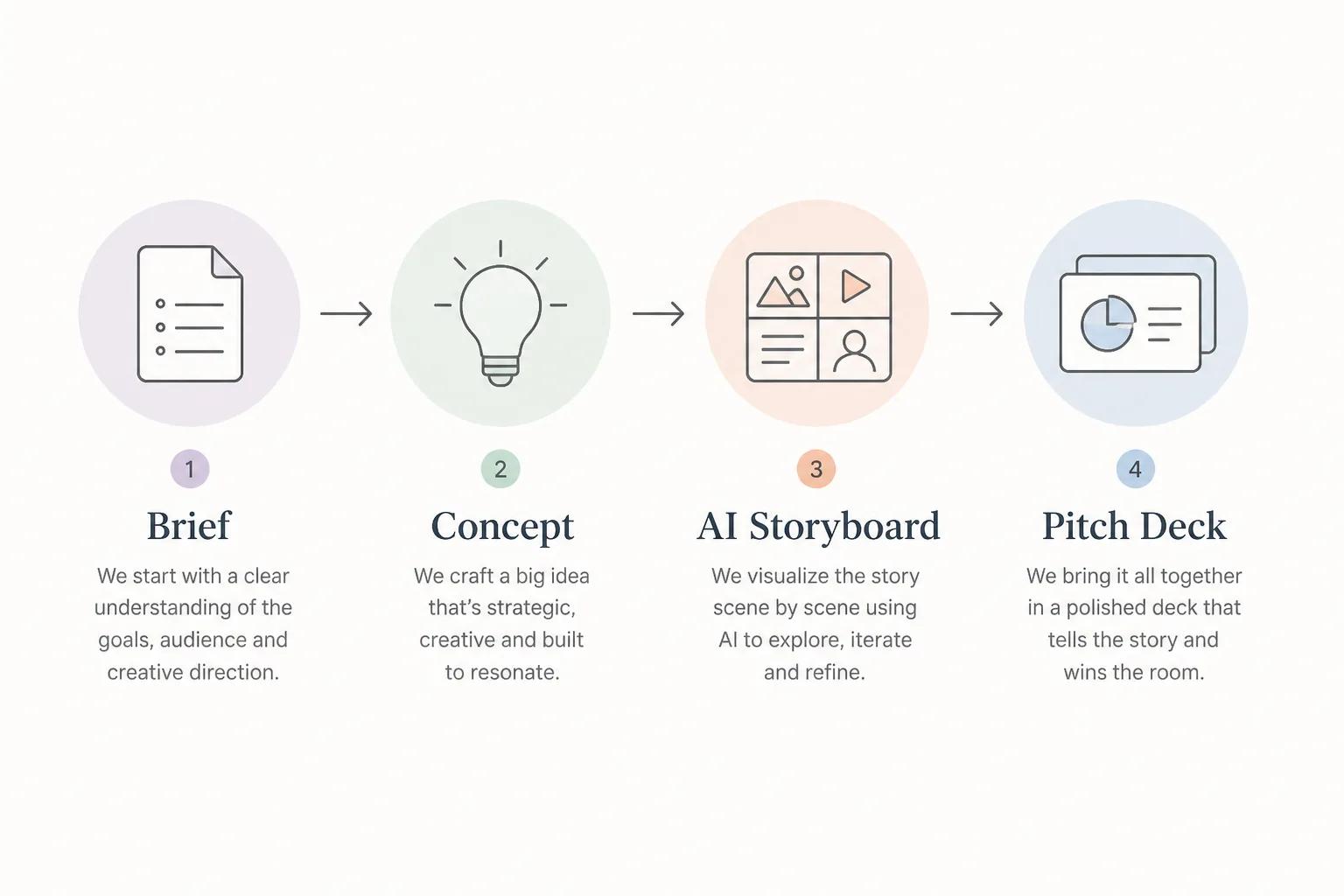
The Agency Workflow: From Brief to Pitch Deck
Here is what a modern AI storyboarding workflow inside an agency actually looks like, end to end. It is not exotic. It is just much faster than the old way.
Step 1: Translate the Brief Into a Treatment
A creative team takes the client brief and writes a short treatment — a paragraph or two per concept describing the spot, the tone, and the key beats. This is the same step that happened before AI. You still need a real idea.
Step 2: Draft the Script or Scene List
Break the treatment into scenes. Each scene gets a one-line description: who is in it, what is happening, what the camera is doing, what the mood feels like. The more specific the scene description, the better the storyboard frame will be.
Step 3: Generate the Storyboard
Drop the scenes into your AI storyboarding tool. Pick a visual style — cinematic, animated, illustrated, photoreal — and lock it across the project. Generate the frames.
This is the moment AI storyboarding earns its keep. What used to take three days takes about thirty minutes.
Step 4: Iterate on Style and Consistency
The first pass will not be perfect. Adjust character looks, lock the colour palette, regenerate any frame that does not land. Good tools keep characters and style consistent scene to scene — that is what makes a storyboard look like a real campaign instead of a collage.
Step 5: Build the Pitch Deck
Drop the frames into your deck template. Add scene captions, the strategic rationale, and the production notes. Done. You have a pitch deck the client can actually picture themselves approving.
What Clients Respond to in AI-Storyboarded Pitches
The shift in client behaviour is the part most agency teams underestimate. When you put real frames in front of decision-makers, three things happen.
Feedback gets specific. Instead of "we love it but" — which usually means they cannot picture it — you get "the second frame, can the woman be older?" Specific feedback is the sound of a deal moving forward.
Stakeholder alignment happens faster. When the CMO, the brand director, and the legal team all look at the same image, they argue less about interpretation. The deck does the disambiguating.
The agency looks more capable. A storyboard that holds together visually signals craft. It says: we know what we are making, we have already seen it in our heads, here it is. Clients buy that confidence.

What to Look For in an AI Storyboarding Tool
Not every AI image generator is an AI storyboarding tool. For agency work specifically, a few features matter more than raw image quality.
Character consistency. The same character has to look like the same person across every frame. If your hero changes faces between scene 1 and scene 4, the storyboard breaks. This is the single biggest differentiator between platforms built for storytelling and platforms built for one-off images.
Style control across the project. A storyboard should feel like one campaign, not eight unrelated images. Look for tools that lock a visual style and apply it across every frame.
Script-to-scene workflow. The fastest tools take written scenes as input and turn them into frames automatically. You spend your time directing, not prompt-engineering each shot.
Iteration speed. You will regenerate frames. Often. The whole value is being able to react to feedback in the room. Slow tools break the workflow.
End-to-end production capability. Some agencies stop at the storyboard. Others now use the same platform to prototype the whole spot — script to scenes to audio to a rough cut. Storytella.ai is built around exactly that flow, which is why it shows up in pitch and pre-vis workflows specifically.
Common Mistakes Agencies Make With AI Storyboarding
A few traps to avoid as your team adopts this workflow.
Treating it as a stock library. AI storyboarding works best when you have a real concept. If you skip the treatment and the script, you get pretty frames that do not add up to a campaign.
Over-polishing the frames. Storyboards are not finished work. Spending two hours regenerating a single frame to make it "perfect" is the wrong use of the tool. Get to "clear enough to sell the idea" and move on.
Ignoring style consistency. A pitch deck where every frame looks like a different artist made it loses the room. Lock the style early.
Using AI storyboarding to replace the idea. The AI does not generate strategy. It does not write the line. It does not know your client's brand. The human work is still the hard part — AI just makes the visuals match the thinking.
Hiding the AI part from the client. Most agency clients now know what AI-generated visuals look like. Pretending the storyboard was hand-drawn is a worse look than just being honest. Frame it as a craft tool, not a shortcut.
FAQ
How long does it take to build a storyboard with AI for an agency pitch?
A full pitch storyboard — 8 to 12 frames, locked style, captioned, deck-ready — takes most teams between two and six hours from a finished script. Compare that to two to four days with a traditional illustrator workflow.
Can AI storyboarding replace an illustrator?
For pitch and pre-vis work, mostly yes. For final art that ships in the campaign, no — that is still a craft job. The right way to think about it is that AI storyboarding lets your illustrators focus on the work that actually goes out the door, not on disposable concept frames.
How do you keep the storyboard looking consistent across frames?
Use a tool that supports character and style locking. Generic AI image tools regenerate everything from scratch every time, which is why they fail on storyboards. Platforms like Storytella.ai are built around keeping the same characters, look, and style across an entire scene sequence.
Will clients accept AI-generated storyboards?
In 2026, almost all of them will, and many actively prefer them because the iteration speed means they get more options. The agencies that hide it tend to land worse than the ones that present it as part of how they work.
Does AI storyboarding work for non-narrative campaigns — product, fashion, brand films?
Yes, and arguably better. Product spots, fashion films, and brand atmosphere pieces are highly visual and lighter on dialogue, which means the storyboard does most of the selling on its own.
What is the difference between AI storyboarding and AI video generation?
Storyboarding produces still frames in sequence. AI video generation produces moving footage. Many agencies use both — frames for the pitch, then video for animatic or final production once the concept is sold.
Is AI storyboarding worth it for a small agency?
Especially for a small agency. The leverage is highest when you do not have a team of illustrators or a long pre-production budget. It lets two or three people pitch like a much bigger shop.
Conclusion
AI storyboarding has stopped being an experiment for agencies. It is becoming the default way pitches get visualised, because it solves the one thing every pitch process is short on: time to make the idea look real before the meeting.
The agencies winning more pitches are not using AI storyboarding to skip the creative work. They are using it to bring the creative work to life faster — which means more options on the table, sharper conversations with clients, and decks that already feel like a campaign instead of a promise.
If your team is still pitching with words and mood boards, the gap is going to keep widening. The good news is the workflow is simple and the tools are ready.
Try Storytella.ai and turn your next brief into a pitch-ready storyboard your clients can actually see.
Your story awaits
The set is ready for you.
Turn your screenplay into stunning storyboards and animatics in minutes — not months. No drawing skills required.
Free to start · No credit card required · Cancel anytime