 Storytella
How Cinematographers Use AI for Shot Composition: A DP's Field Guide
See how working DPs fold AI into prep for framing, lensing, blocking, and lighting while protecting their visual style.
If you've ever stood on a set debating a lens choice with the director while the sun drops, you already know what AI cinematography is trying to solve. It's not about replacing the operator. It's about doing the slow, expensive thinking — framing, blocking, lighting, lensing — before anyone calls "rolling." This guide is for working DPs who want to use AI for shot composition without giving up the craft. We'll walk through where AI actually helps, where it doesn't, and how to fit it into a real cinematography workflow using tools like Storytella.ai.
What AI Cinematography Actually Means
AI cinematography is the use of generative tools — text-to-image, text-to-video, and increasingly text-to-scene platforms — to test, refine, and lock visual decisions before production. It does not replace your camera, your gaffer, or your eye. It replaces the napkin sketch, the rough storyboard, and the ten minutes you'd spend explaining "I want it more like this" to the director.
For a DP, the value is upstream. You're using AI in prep, not on set. You're previsualizing a frame to share with the director and gaffer, not generating final footage. That distinction matters — and it's the lens this guide is written through.
Where AI Helps in Shot Composition (and Where It Doesn't)
Be honest about the tool. AI is excellent at some parts of cinematography prep and useless at others.
AI helps with:
- Framing variants — wide vs. tighter, headroom, lead space
- Lens approximation — the feel of a 24mm vs. a 50mm vs. an 85mm
- Mood and lighting direction — sun position, color temperature, contrast
- Blocking ideas — where actors stand, where the camera lives
- Visual language consistency across scenes
AI doesn't replace:
- A real lens test on the actual camera body
- A site recce or tech scout
- An experienced operator's instinct on a moving rig
- Color science decisions for finishing
Treat AI like a fast, tireless sketch artist. Trust it for direction. Don't trust it for spec.
Step 1: Build a Visual Brief Before You Build Frames
Don't open a generator and start typing. You'll get noise.
Before you generate a single frame, write a short visual brief. One page is enough. It should cover:
- Project tone: "Cold, observational, quiet"
- Aspect ratio: 1.85, 2.39, 2.0 — whatever you've locked
- Reference films: Two or three, named honestly
- Lensing language: "Mostly 35mm and 50mm. No anamorphic flares"
- Color and contrast direction: "Desaturated, slightly warm shadows, hold the highlights"
- Camera movement: Static, dolly-led, handheld
This brief becomes the prompt prefix you reuse across every shot you generate. That's how you keep visual consistency — by constraining the inputs, not by trusting the model to remember.
Step 2: Generate Framing and Lens Tests
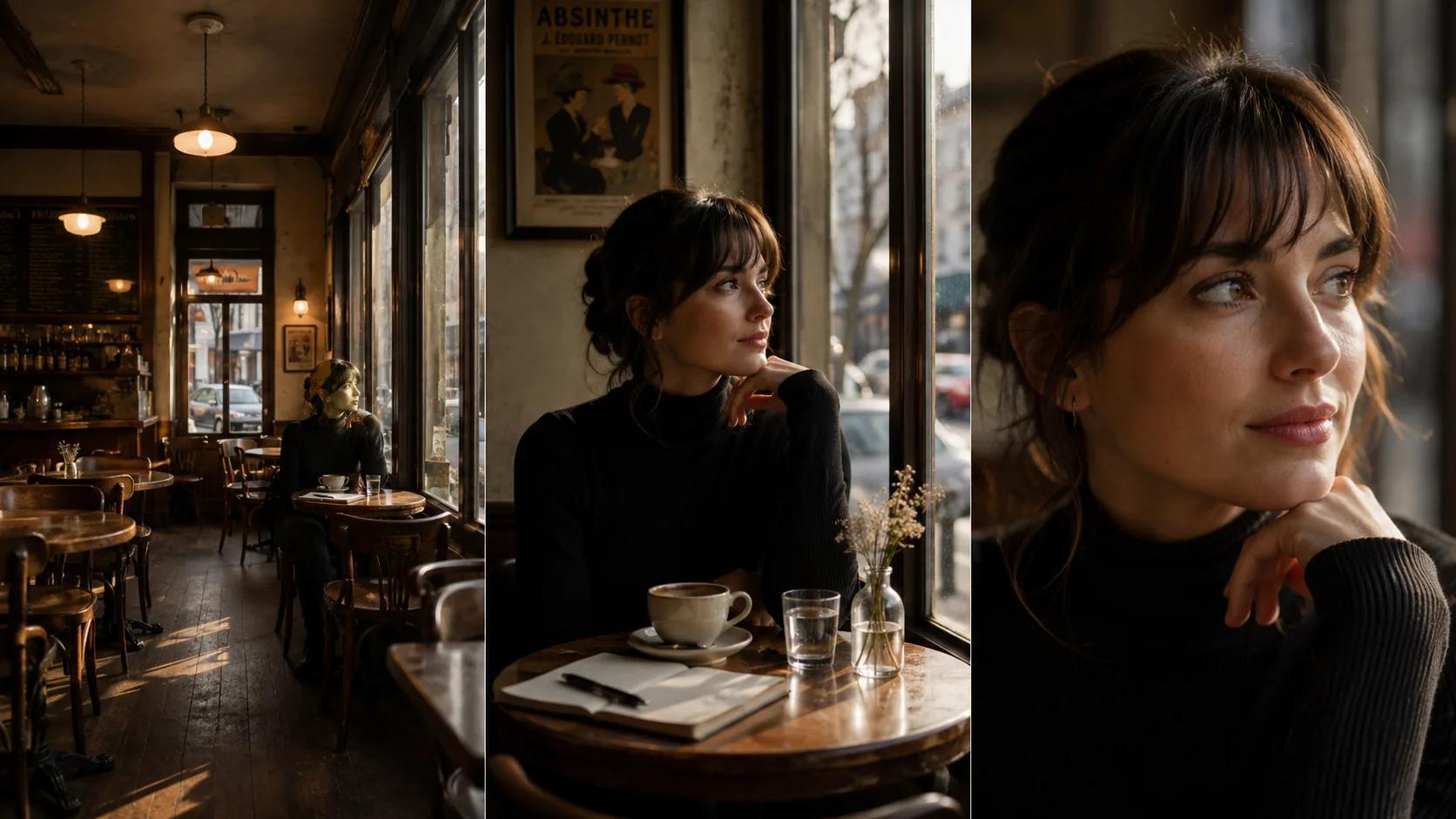
Now you can start framing. Pick a scene you've already broken down. Take one beat — a moment, not a whole sequence — and generate four to eight variants of it.
What to vary, deliberately:
- Lens length: generate the same beat as a wide, a normal, and a long lens
- Headroom and lead space: tight vs. loose, centered vs. weighted
- Camera height: eye-line, lower, higher
- Angle: profile, three-quarter, frontal
You're not picking the final frame yet. You're collecting options to bring to the director.
A good prompt template for this stage:
[Project visual brief] — [scene description] — shot on [lens length] —
[character action] — [camera height/angle] — [time of day] — [mood].
Run that template through your generator with the lens length swapped out. You'll quickly see which length carries the emotion of the beat. In platforms built for sequential filmmaking like Storytella.ai, you can lock your style and character look first, then iterate framing without the visuals drifting off-brief between attempts — which is the real bottleneck with general-purpose image tools.
Step 3: Test Blocking and Eyelines
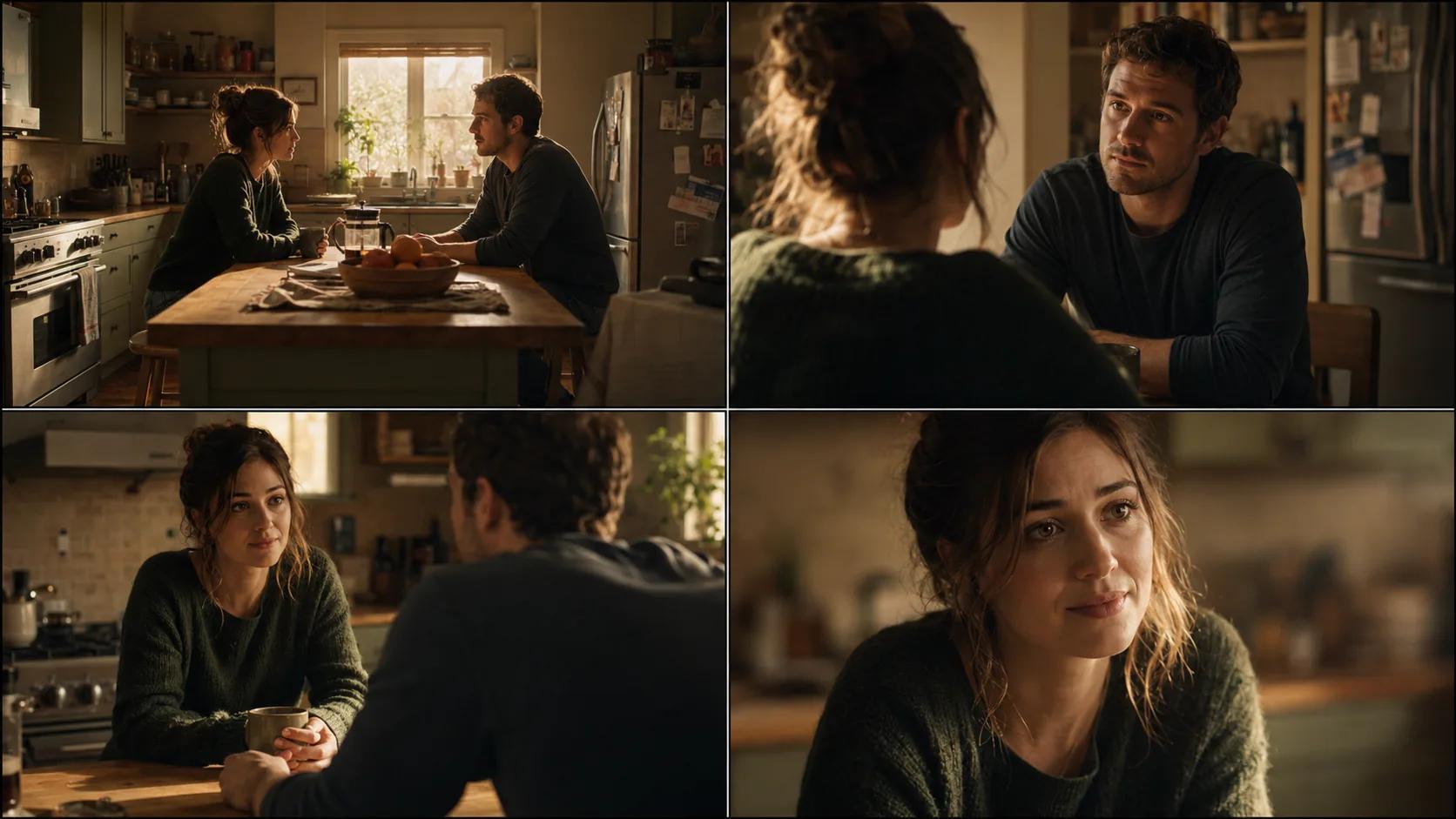
Once a lens choice starts to feel right, test the blocking. This is where AI cinematography earns its keep — you're catching geometry problems before the day.
For a two-person scene, generate:
- Both actors on screen, profile
- OTS from each side
- Singles, matched eyeline
- A wider master with the room visible
What you're checking: are the eyelines plausible? Does the room geography hold up across the cuts? Does the director's intention for who has power in the scene actually read in the frame?
You'll often find a problem the director didn't anticipate — a doorway that breaks the 180, a window that blows out the singles, an actor's mark that puts them in a worse light than the master suggested. Catching it now costs nothing. Catching it on the day costs an hour.
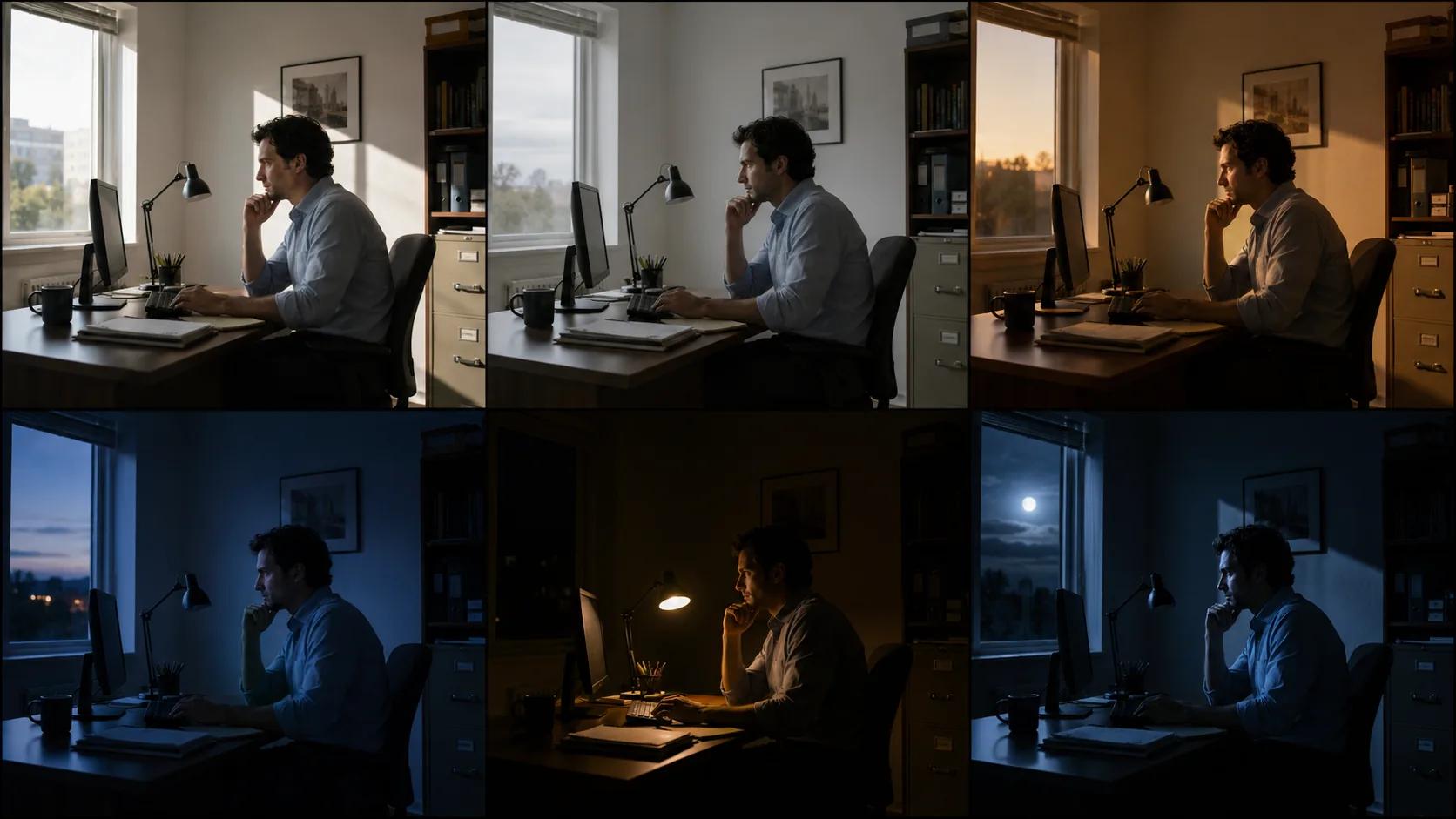
Step 4: Run Lighting and Mood Variations
This is the conversation you usually have standing next to a Skypanel at 7 a.m. Have it at your desk instead.
For each locked frame, generate variants for:
- Time of day: sunrise, midday, golden hour, dusk, night
- Key direction: frontal, three-quarter, side, back-key
- Color temperature: warm tungsten, neutral daylight, cool moonlight
- Practicals: lamps on or off, motivated sources, fire, screens
This isn't a substitute for a lighting plan. It's a conversation tool. You walk into the gaffer prep meeting with a frame that says "this is what I want it to feel like at 5:30 p.m." instead of three reference stills from three different films. Decisions get made faster, and the gaffer can pre-pull the right gear.
Step 5: Use AI Previs to Lock Your Shot List
Now bring it together. Once you've made framing, lens, blocking, and lighting decisions for each beat, you can string them together into a previs sequence. This is the deliverable that turns the director, the AD, and the producer into believers.
Build the previs at the level of detail you actually need. For most narrative work, a clean image-based previs — a single composed frame per shot, ordered, with notes — is more useful than a half-baked moving previs. For action and VFX work, push into short generated clips so you can see motion and timing.
Then export the shot list with the previs frame attached to each row. You've now done in two days what used to take a week of storyboarding meetings, and your shot list is no longer an abstraction — it's a film you can already see.
Common Mistakes Cinematographers Make With AI
A few patterns that quietly cost you days.
Generating without a brief. You'll get pretty frames that have nothing to do with your film. Brief first, frames second.
Trusting the model on lens character. A "shot on 50mm" prompt is approximate, not literal. Use it for emotional direction, not optical accuracy. Always confirm with a real lens test.
Inconsistent characters. If your wide and your OTS look like two different actors, your previs is useless. Use a tool that holds character consistency across frames — or fix the characters before you generate.
Letting AI make the final call. The model doesn't know your director, your actors, or your location. It offers options. You choose.
Skipping the on-set step. AI prep doesn't excuse a recce or a tech scout. The frame the model gave you was a guess about the room. Walk the room.
FAQ
Can AI replace a cinematographer?
No. AI handles previsualization, framing variants, and mood tests — the slow upstream work. The DP still owns lighting on set, lens choice on the actual camera, operator performance, and the working relationship with the director and gaffer. AI is a prep tool, not a replacement for judgment built on years behind a camera.
What's the best AI tool for cinematography prep?
The best tool for narrative shot composition is one that holds character and style consistency across multiple frames, lets you test framing variants quickly, and connects your prep to a real production workflow. Generic image generators struggle with consistency across a sequence. Platforms built for filmmaking like Storytella.ai are designed for this kind of sequential work.
How accurate is AI for testing lens choices?
Roughly accurate, not optically accurate. AI is good for the feel of a focal length — the compression of an 85mm, the breath of a 24mm. It's not a substitute for putting glass on a body and shooting a chart. Use AI to make a confident first call, then verify with a real lens test before the shoot day.
Should I use AI on set, or only in prep?
Mostly prep. On-set generation is slow, breaks the flow of a working set, and rarely beats a quick reframe with the operator. The exception is reshoot prep between takes — generating a quick reference frame for an idea the director just had, while the crew resets. Treat it as a sketch tool, not a director's monitor.
How do I keep visual consistency across an entire film?
Lock your style and character look in your prep tool before you start generating individual shots. Reuse the same project-level visual brief as the prompt prefix for every frame. Use a platform that maintains character consistency between scenes. If your previs frames look like they belong in the same film, your shoot is much more likely to as well.
Will AI cinematography work for documentary or live action?
For documentary, less. The whole point of documentary is what you couldn't have predicted. For controlled live action — narrative, commercials, music video, branded content — yes, very well. The more controlled the production, the more AI prep pays back. Anything you can previsualize, you can now previsualize faster.
Conclusion
AI cinematography isn't about handing your craft to a model. It's about doing the unglamorous prep work — the framing tests, the blocking checks, the mood variations — at a speed that used to be impossible. The DPs who get value out of it are the ones who bring a clear visual brief, use AI to multiply options, and still make every final call themselves.
The frame is still yours. The lens is still yours. The light is still yours. AI just lets you arrive on the day with sharper questions, fewer surprises, and a shot list everyone has already seen.
Try Storytella.ai and take your shot composition from idea to fully previsualized film without losing your eye for the frame.
Your story awaits
The set is ready for you.
Turn your screenplay into stunning storyboards and animatics in minutes — not months. No drawing skills required.
Free to start · No credit card required · Cancel anytime