 Storytella
Can AI Create a Storyboard from a Script? Here's What Works in 2026
A clear answer to the question every solo filmmaker is asking right now — plus the script-to-storyboard workflow that actually delivers usable shots in 2026.
If you've ever stared at a finished script wondering how you'd ever turn it into shots, you're not alone. Storyboarding has always been the slowest, most expensive bridge between writing and shooting — and the one place most indie projects get stuck. The good news: in 2026, AI can take you from script to storyboard in minutes, not weeks. The honest news: not every tool does it well, and the results depend a lot on what you feed in. This guide explains what genuinely works right now, what to avoid, and how to use Storytella.ai to go from a screenplay to a usable visual board on the first pass.
Can AI Create a Storyboard from a Script?
Yes. In 2026, AI can read a script and generate a storyboard from it — automatically, in minutes, with shot-by-shot frames that match the action and dialogue. The best tools parse the screenplay into scenes, identify the characters and locations in each scene, and produce visual frames that reflect what's actually happening on the page.
What's changed since the early generation of "AI storyboard" tools is consistency. Modern script-to-storyboard systems keep the same character looking like the same character across every frame. They hold a single visual style across the whole board. And they output frames that look like real pre-vis rather than stock illustrations.
Three things now work reliably:
- Parsing a screenplay into discrete scenes and shots
- Generating shot frames that match scene action, dialogue beats, and emotional tone
- Holding character and style consistency across an entire storyboard
You still drive the creative decisions. The AI does the visual labor.
How AI Turns a Script into a Storyboard (Step by Step)
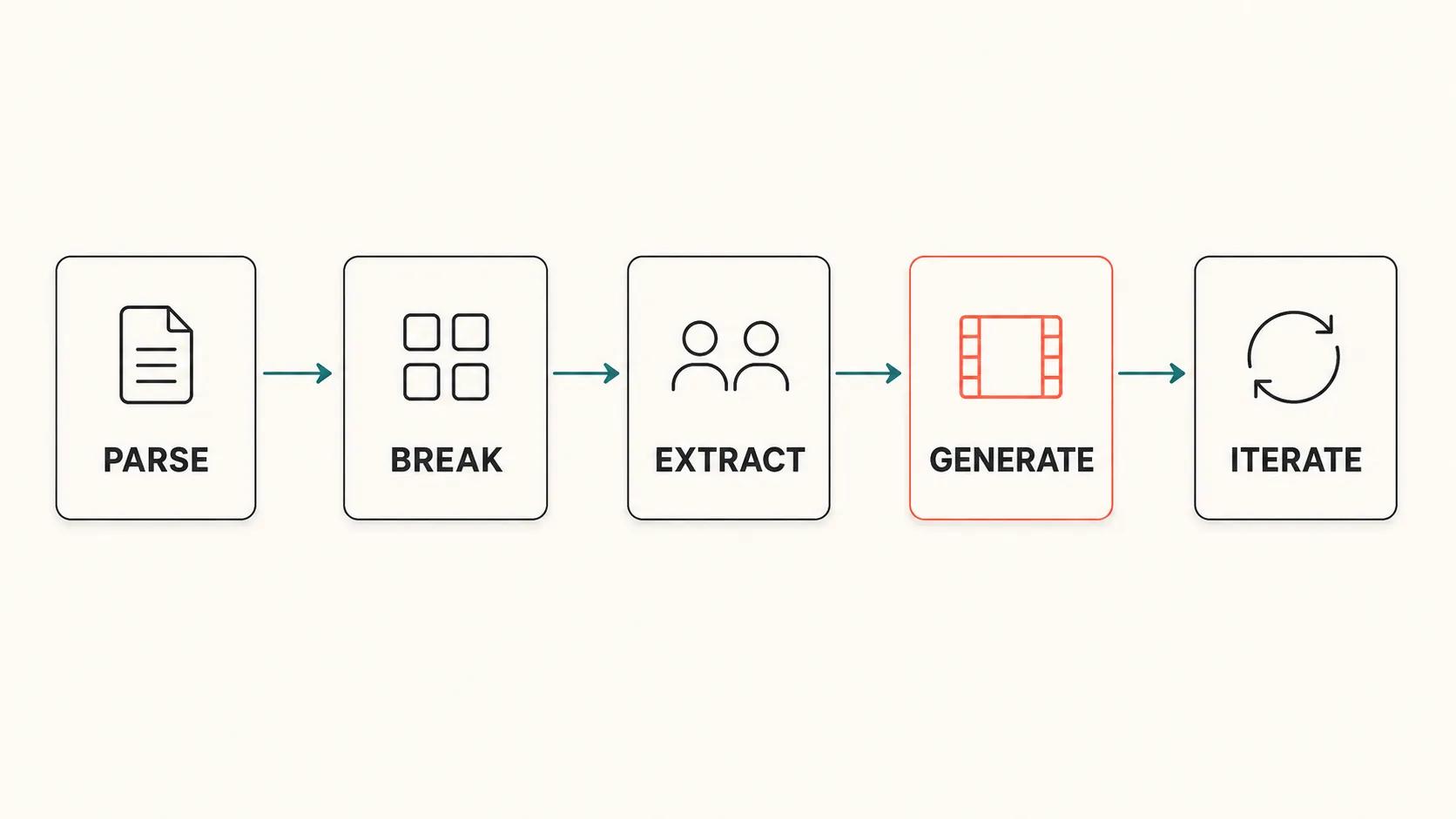
Most modern script-to-storyboard tools follow a similar five-step pipeline. Understanding it helps you write prompts and scripts the AI can actually use.
Step 1 — Script parsing
The system reads your screenplay and breaks it into structural pieces: scene headings (INT./EXT.), action lines, character names, dialogue, and parentheticals. Standard Fountain or Final Draft formatting works best — formatting matters here because it tells the AI where a new scene begins.
Step 2 — Scene and shot breakdown
Each scene gets analyzed for what's happening visually. The AI decides where to break a scene into multiple shots — for example, a dialogue exchange might become a wide two-shot followed by two over-the-shoulder shots and a close-up reaction.
Step 3 — Character and location extraction
The AI pulls characters and locations out of the script and assigns visual references to each. This is the step that makes character consistency possible: once "Maya" has a visual identity, every Maya shot in the storyboard pulls from the same reference.
Step 4 — Frame generation
Each shot becomes a generated image. Good tools let you specify a visual style (gritty realism, animated, noir, etc.) that gets applied across all frames so the storyboard reads as a single film, not a collage.
Step 5 — Iteration
You review the board, swap out shots you don't like, adjust framing or composition, and regenerate. The faster the iteration loop, the more useful the tool — this is where most legacy storyboarding eats time.
What Actually Works in 2026
Not every promise on a landing page is real. Here's what genuinely works today, based on what the current generation of tools can deliver consistently.
| Capability | Works in 2026? | Notes |
|---|---|---|
| Auto-parsing a properly formatted screenplay | Yes, reliably | Fountain, Final Draft, and clean PDFs all work |
| Generating one frame per shot | Yes, reliably | Quality depends on the underlying image model |
| Character consistency across frames | Yes, on leading platforms | Best when characters are introduced clearly in the script |
| Consistent visual style across the board | Yes, on leading platforms | Choose a style once, applied across all frames |
| Camera framing (wide, MS, CU, OTS, POV) | Yes, with guidance | Specifying framing in action lines improves results |
| Multi-character scenes with correct positioning | Mostly | Two-character scenes are reliable; 4+ still struggles |
| Action sequences with clear motion | Partially | Single-frame action works; multi-frame motion needs work |
| Lighting and time-of-day matching script | Yes | INT./EXT. and time-of-day headers carry through |
| Emotional tone matching dialogue | Yes, increasingly accurate | Strong with clear emotional cues in the script |
The headline: any clearly written, properly formatted screenplay can now produce a usable first-pass storyboard in under an hour. That was not true even two years ago.
What Doesn't Work Yet (and How to Plan Around It)
Being honest about the limits saves you time. Here are the four things AI script-to-storyboard tools still struggle with — and the workaround for each.
Complex multi-character blocking. Scenes with four or more characters in a tight space often produce frames where characters overlap awkwardly or one disappears. Workaround: break busy scenes into multiple two- or three-shot beats in the script itself.
Sustained action choreography. A six-frame fight sequence will often lose continuity — character positions, weapon hand, even clothing can drift between frames. Workaround: storyboard fight beats as discrete moments rather than a continuous sequence, and rely on the final film's edit to bridge them.
Specific real-world references. "A 1972 Ford Mustang in candy-apple red" might come back as a generic muscle car. Workaround: upload a reference image alongside the script, or call out the reference in the prompt for that specific frame.
Highly stylized hand-drawn aesthetics. Some directors want a deliberately rough, sketch-style board. Most current AI tools optimize for photorealism or polished animation, not raw pencil. Workaround: choose a tool that explicitly supports a sketch style, or use a stylization filter on top of generated frames.
How to Get the Best Results from a Script-to-Storyboard Tool
The single biggest predictor of storyboard quality is the script you feed in. The AI is only as specific as your writing. These five practices consistently produce better results.
1. Use standard screenplay formatting. Fountain, Final Draft, or clean industry-standard PDFs parse most reliably. Avoid pasted plain text without scene headings — the AI can't break what it can't structure.
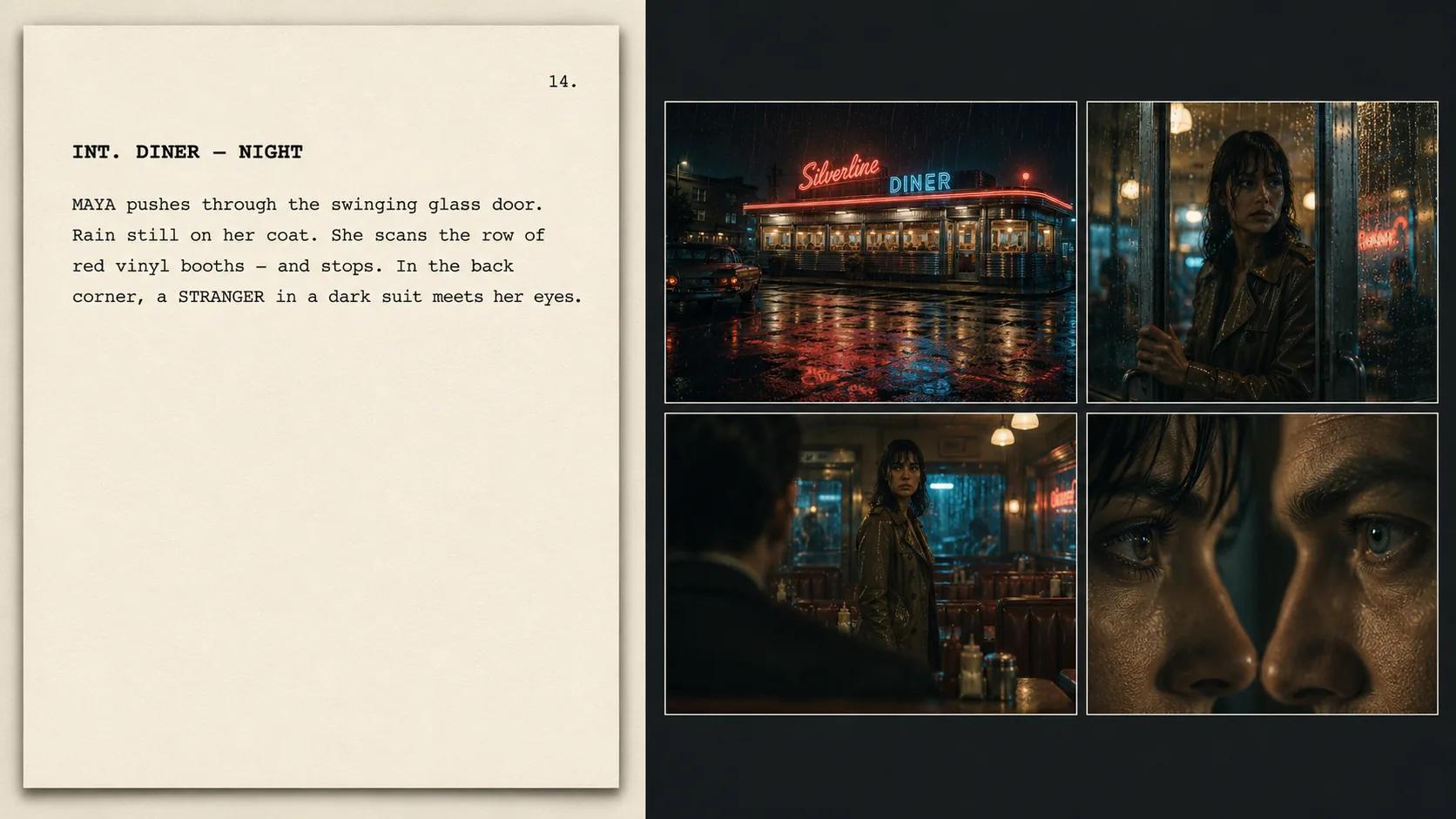
2. Be specific in action lines. "She walks into the room" is weaker than "She pushes through the swinging door, scanning the booths for him." Specific verbs and visual details give the AI something to render.
3. Introduce characters with visual anchors. The first time a character appears, add a one-line visual description. This becomes the AI's reference for every subsequent frame.
4. Specify framing when it matters. If you need a tight close-up, write "TIGHT ON" or "CLOSE-UP" in the action line. The AI honors framing cues when they're explicit.
5. Pick your style once, up front. Choose a visual style (e.g., gritty 35mm, animated, anime, noir) before generating, and apply it to the whole board. Switching styles mid-board breaks consistency.
In Storytella.ai, all five of these happen inside one workflow — you import the script, the platform parses it into scenes, you set the style and character references once, and the storyboard generates in a single pass. From there, you can regenerate individual shots, swap framing, or push the whole project forward into full video generation without leaving the platform.
AI Storyboard vs Traditional Storyboard
For most indie filmmakers in 2026, AI storyboarding is no longer "the cheap alternative." It's the default. Here's how the two approaches compare on the things that actually matter.
| Factor | Traditional Storyboarding | AI Storyboarding (2026) |
|---|---|---|
| Time per board | 1–4 weeks | 15 minutes to 2 hours |
| Cost | $500–$5,000+ | $0–$50 per project |
| Revision speed | Days per round | Minutes per round |
| Character consistency | Manual, drawing-dependent | Automatic across all frames |
| Style consistency | Manual, drawing-dependent | Automatic across all frames |
| Skill required | High (drawing or hiring) | Low (clear writing) |
| Best for | Studio films with full crews | Indie, solo, and fast-iteration projects |
Traditional storyboarding still wins when you need a specific hand-drawn aesthetic that's part of the film's identity, or when a studio production requires a named storyboard artist on the credits. For everyone else, AI storyboarding is simply faster, cheaper, and good enough.
How to Choose the Right Script-to-Storyboard Tool
Most "AI storyboard" tools fall into one of three camps. Knowing which camp a tool is in tells you whether it'll actually work for you.
Single-frame image generators with a storyboard label. These are basically image-generation tools dressed up with a grid layout. They produce frames one at a time and don't maintain character or style continuity. Cheap, but you'll spend the saved time fighting consistency.
Dedicated storyboard tools. These parse scripts properly, handle scene breakdown, and produce cohesive boards. They're a real upgrade over the first camp, but they stop at the board — you still need separate tools to take the storyboard into video.
End-to-end AI filmmaking platforms. These do the storyboard and let you continue into scene generation, audio, and final cut without exporting and re-importing into different tools. This is the category Storytella.ai is built for — script-to-storyboard is one step in a larger workflow that takes the same project all the way to a finished film.
For one-off boards, a dedicated storyboard tool is fine. For ongoing filmmaking — where the storyboard is supposed to become a video — an end-to-end platform saves you from rebuilding character references and visual style from scratch at every stage.
FAQ
Can AI really turn a screenplay into a storyboard automatically?
Yes. In 2026, AI can read a properly formatted screenplay, break it into scenes and shots, and generate a frame-by-frame storyboard automatically. The best results come from scripts written in standard format with clear action lines and visual descriptions of characters.
How long does it take AI to make a storyboard from a script?
A typical short film script (10–20 pages) generates a full storyboard in 15 to 60 minutes on modern platforms. A feature-length script might take 2 to 4 hours for a complete first pass, after which you iterate on individual shots.
Is an AI storyboard good enough to actually shoot from?
For most indie productions, yes. AI storyboards in 2026 are detailed enough to communicate framing, blocking, and visual tone to a crew — or to drive a full AI video generation pass if you're shooting solo. They're typically better than rough thumbnails and roughly on par with a mid-level storyboard artist's first draft.
Can AI maintain the same character look across every storyboard frame?
Yes, on the leading platforms. Character consistency is one of the biggest improvements of the last two years — once you've introduced a character (either with a reference image or a clear visual description in the script), the AI keeps that character visually consistent across every frame in the board.
Do I need to know how to draw to use AI storyboarding?
No. If you can write a clear screenplay, you can produce a storyboard. The AI handles all the visual work — drawing skill is irrelevant. What matters is how clearly you describe what's happening on the page.
Can I make changes to specific storyboard frames after generation?
Yes. Modern tools let you regenerate individual frames, swap camera angles, or adjust framing without redoing the whole board. This is one of the biggest advantages over traditional storyboarding, where every change meant another illustration round.
What if my script is just a rough outline, not a full screenplay?
Most tools work best with full scripts, but several — including Storytella.ai — can also generate storyboards from outlines or even short concept descriptions. The trade-off is that the AI makes more visual decisions on its own when the source material is thinner, so you'll iterate more to land on the right look.
Conclusion
The question used to be "can AI even do this?" In 2026, the question is "which tool, and how do I get the best result." AI can absolutely turn a script into a storyboard — quickly, consistently, and at a quality that's genuinely usable for indie production. The catch is that the result reflects what you put in. A vague script gives you a vague board. A specific script, written with the AI in mind, gives you a storyboard you can actually shoot from.
For solo filmmakers, content creators, and anyone who's tired of pre-production eating months of their schedule, this is the change that finally makes the math work. You can take an idea from script to shot list to first frames in an afternoon — and if you're working in an end-to-end platform, keep going from those frames all the way to a finished film without ever leaving the tool.
Try Storytella.ai and go from script to storyboard to final cut — no crew, no draft cycles, no waiting.
Your story awaits
The set is ready for you.
Turn your screenplay into stunning storyboards and animatics in minutes — not months. No drawing skills required.
Free to start · No credit card required · Cancel anytime