 Storytella
AI Pre-Production: The Complete 2026 Guide for Indie Filmmakers
The 10-step pre-production workflow that takes a script from blank page to shoot-ready in days, not months — built for filmmakers without a crew.
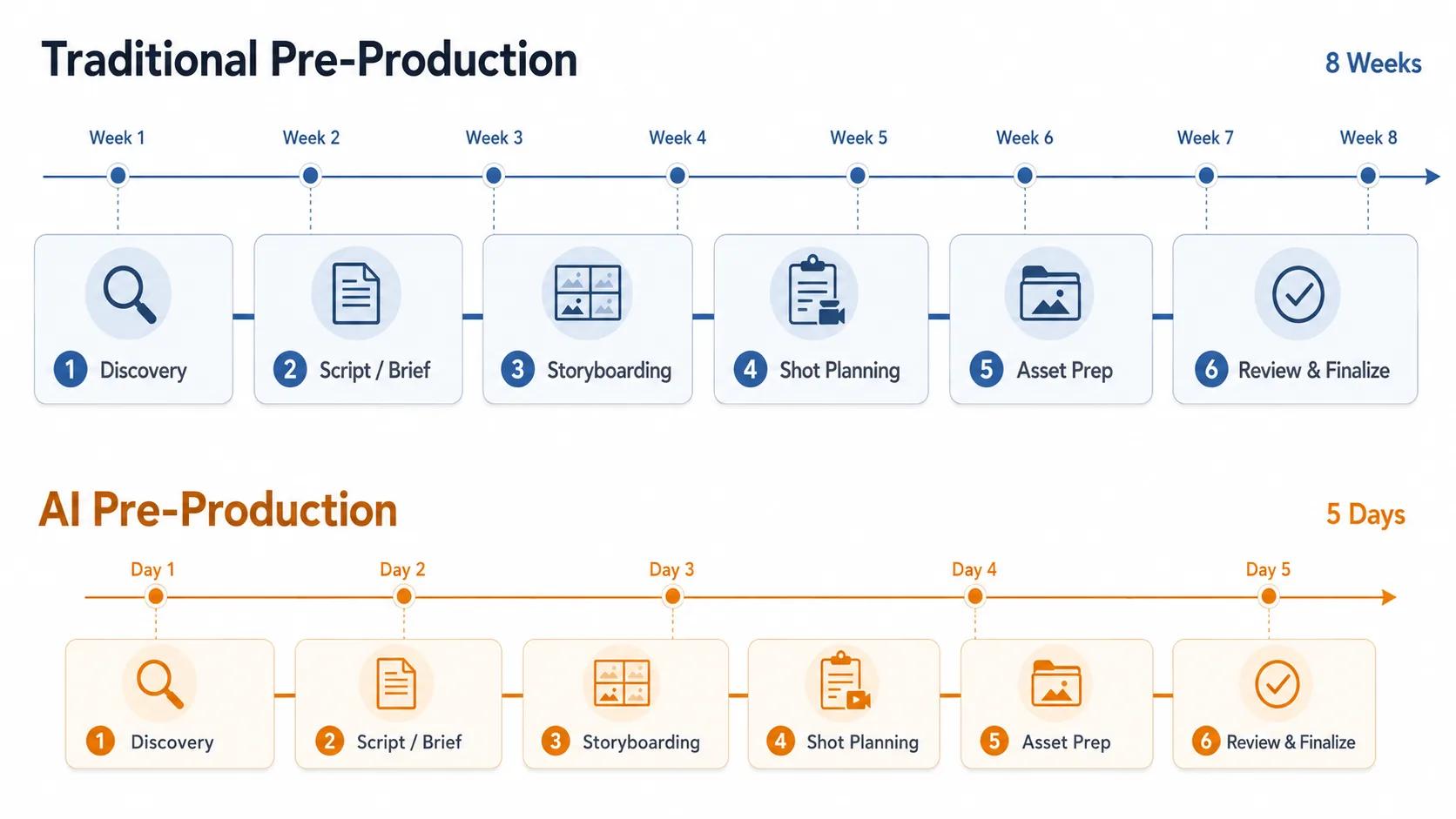
If you're trying to make a film without a studio, a producer, or a development team, you need more than a long script and a Google Doc full of notes. A strong AI pre-production guide should walk you through every step between the idea in your head and the day you press record — without burning weeks on tasks that AI can now handle in hours. In this guide, you'll learn the exact pre-production pipeline indie filmmakers are using in 2026, from concept to previs, and how to run it end-to-end with tools like Storytella.ai.
This is the pillar piece in our pre-production cluster. Each section is short on purpose — every step deeper is a dedicated guide of its own.
What Is AI Pre-Production?
Pre-production is everything that happens between having an idea and shooting the first frame. Traditionally, it covers scriptwriting, storyboards, mood boards, shot lists, casting, location scouting, scheduling, and budgeting — work usually spread across a writer, a director, a DP, a producer, a production designer, and an AD over several weeks or months.
AI pre-production is the same work, accelerated and consolidated by AI tools that can draft, visualize, plan, and iterate at machine speed. Instead of a five-person team and a month-long timeline, a solo filmmaker can run the entire pipeline in days — and often inside a single platform.
The point isn't to skip pre-production. The point is to do more of it, faster, and at a higher fidelity than a small team ever could on its own.
Why AI Is Transforming Pre-Production
Three shifts converged between 2023 and 2026 to make this possible.
Generative video matured. Tools can now render watchable, style-consistent footage from a prompt or a script. That means pre-production deliverables — storyboards, animatics, previs — can be generated as actual moving scenes, not static drawings.
Character consistency became reliable. You can hold a character's face, body, and wardrobe across hundreds of shots. Casting decisions now happen in pre-production, not after a long search process.
End-to-end platforms appeared. The old workflow had you bouncing between Final Draft, Milanote, Shot Lister, StudioBinder, Frame.io, and ten browser tabs. Modern platforms collapse the pipeline into one place where your script, scenes, characters, and shot logic stay in sync.
The result: indie filmmakers can now go from a one-line idea to a shoot-ready package with shot list, animatic, casting, and schedule in a single weekend.
The 10-Step AI Pre-Production Pipeline
This is the order most indie filmmakers and content creators run in 2026. You don't have to follow it rigidly — but skipping steps usually shows up on shoot day.
Step 1 — Concept Development
Start with a logline, a tone reference, and a constraint. AI is fastest when you give it boundaries: "A 7-minute neo-noir short, set in a single diner, two characters, mood like Drive meets Paris, Texas." Use a chat model to pressure-test the premise: does the concept have a turn? Is the protagonist active? Is there a visual hook in the first 30 seconds? Don't move forward until those three answers are yes.
Step 2 — Scriptwriting and Story Development
Modern AI scriptwriting tools draft scene-level beats, dialogue passes, and full pages in standard format. The discipline is to direct them rather than accept the first output. Give the AI your logline, your tone references, and your character one-pagers, then iterate scene by scene. Most indie filmmakers report their best results when they use AI for first drafts and structural rewrites, but write the emotional beats themselves.
A finished script is the foundation everything else depends on. Treat it like one.
Step 3 — Mood Boards and Visual References
Mood boards used to mean a Pinterest spree and a PDF nobody opened again. AI-generated mood boards are different: you describe the look — "1970s warm grain, anamorphic flare, magic-hour amber, shallow focus" — and the tool returns 20 frames in that exact style. Better still, the same style description can be applied across your whole production later, so the mood board is your visual contract for the film.
Step 4 — Storyboarding
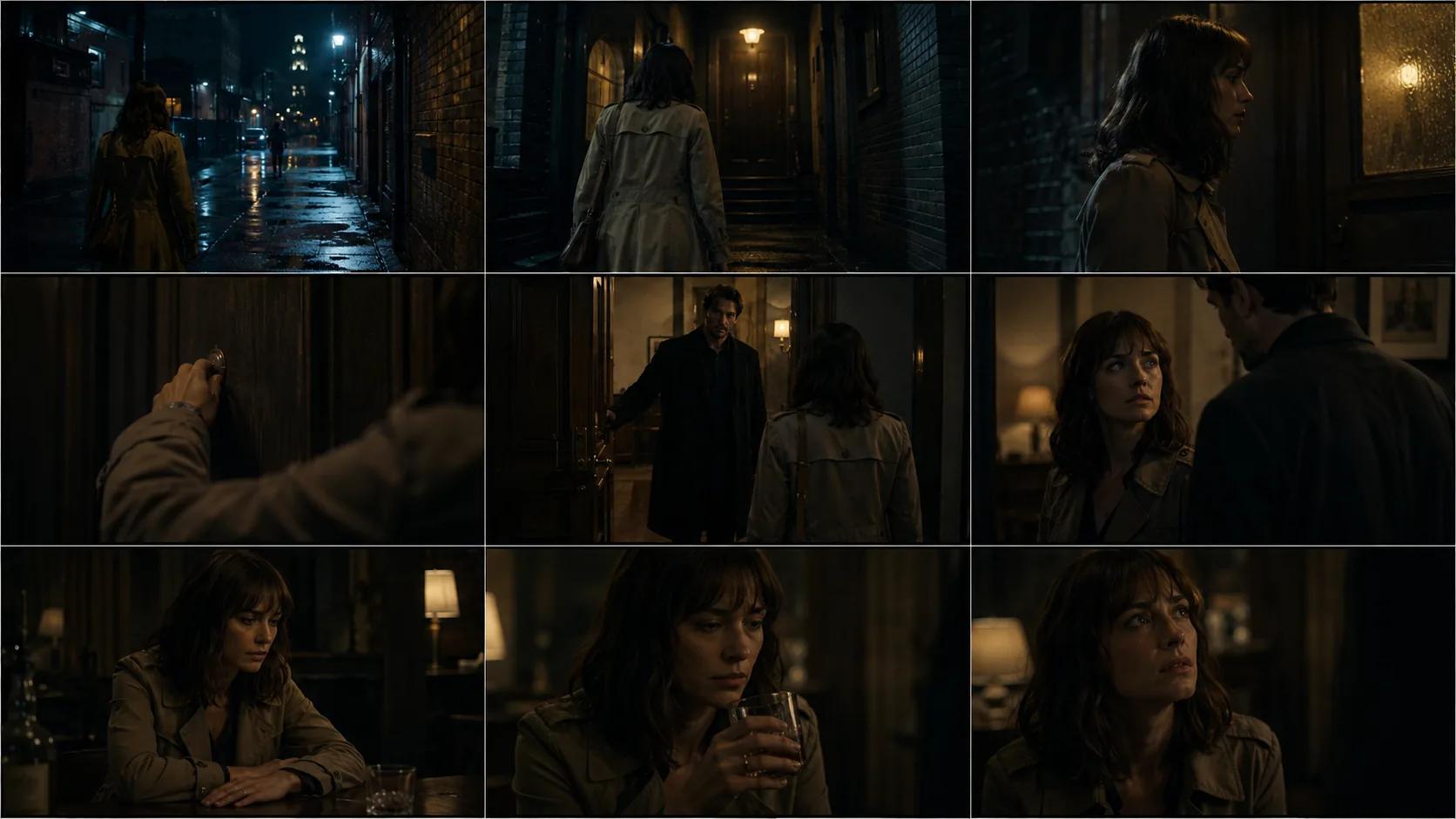
Storyboarding is where AI pre-production stops feeling incremental and starts feeling new. You feed in a script scene, the AI returns panel-by-panel boards in your chosen visual style, with characters that already match your cast. Want to try a different camera angle on shot 4? Regenerate. Want the whole scene at night instead of dusk? Regenerate.
The discipline here is to block before you board — know where your characters are in the space, where the camera is, and what the scene needs to deliver emotionally. Otherwise you'll generate pretty frames that don't cut together.
Step 5 — Shot Listing and Coverage Planning
A shot list is your shoot day's spine. AI tools can derive a first-pass shot list directly from your script — wide, medium, close, insert, B-roll — and tag each shot with lens choice, camera movement, and approximate run time. Your job is to review it as a director, not as a spreadsheet operator. Cut shots that don't earn their place. Add coverage where the scene's emotional turn lives.
Step 6 — Casting and Character Design
If you're using live actors, AI helps you pre-visualize the cast — generate test frames of candidates in costume, in the scene, with the lighting you've chosen. It's a faster, cheaper version of a wardrobe and lighting test.
If you're using generative actors, casting is character design. You define the look, the wardrobe, the age, the energy — then lock the character so they stay consistent across the film. This is the single most-changed part of pre-production in the last two years.
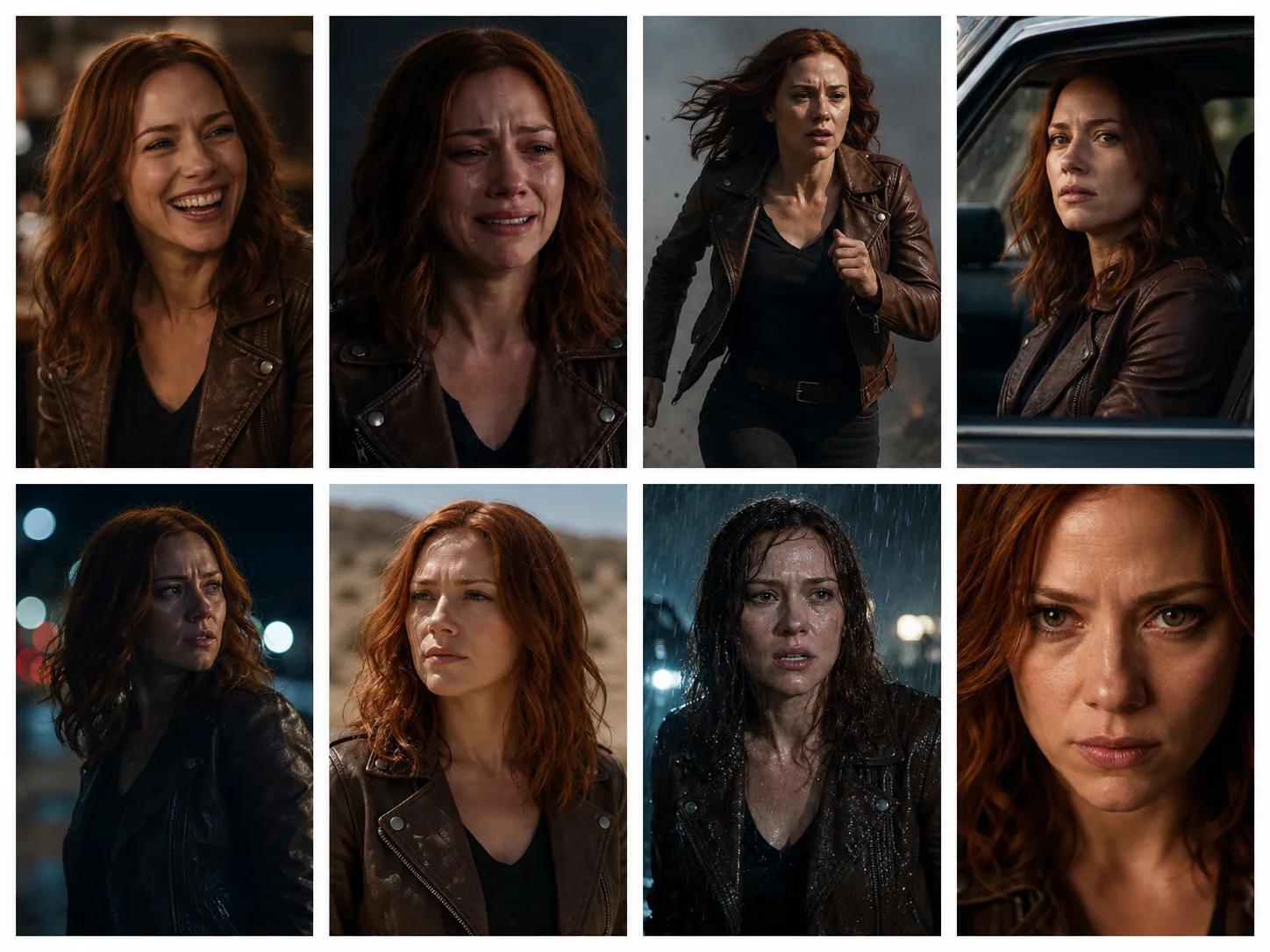
Step 7 — Location Scouting
Real locations still matter for live-action shoots — and AI helps here too. Tools can generate previs frames of your scene set in candidate locations, so you can compare a warehouse-vs-rooftop choice before booking anything. For generative shoots, "location scouting" becomes prompt curation: building a small library of environments your story will reuse, each tested for consistency and mood.
Step 8 — Production Scheduling
A shoot day costs money — your money, your crew's time, or your generative budget. AI scheduling tools take your shot list, your location groups, your cast availability, and your day length, then return a stripboard that minimizes setups and respects the constraints you've set. The output isn't sacred; you'll adjust it. But starting from a defensible first pass is far faster than building one from scratch in a spreadsheet.
Step 9 — Budgeting
Indie budgets fail in pre-production, not in post. AI-assisted budgeting helps in two ways. First, it benchmarks: given your shot list, location count, and cast size, what have comparable projects cost? Second, it scenarios: what happens to your budget if you cut three locations, or shoot two days instead of three, or move one location to a generative environment? The number you walk into production with should be a decision, not a guess.
Step 10 — Previsualization (Previs)
Previs is the final pre-production deliverable: a rough animated version of your film, cut to your edit plan, with placeholder dialogue and music. In 2026, previs is increasingly indistinguishable from a finished short — generative tools render scenes in your chosen style, with your locked characters, in the order they'll appear in the final cut.
Previs is the moment your film stops being abstract and starts being real. It's also the moment you discover which scenes don't work — before you commit to shooting them.
Choosing the Right AI Pre-Production Platform
There are roughly three kinds of tools you'll encounter.
Single-purpose AI tools. A great scriptwriting assistant, a great storyboard generator, a great scheduler — but you have to stitch them together yourself. Best if you already have a workflow and just want to upgrade a piece of it.
Pre-production-only suites. Multiple pre-production functions in one app — scripts, boards, schedules — but they hand off to a separate production tool. Better than juggling tabs, but you still face an integration break before the shoot.
End-to-end platforms. Pre-production, production, and final cut in one environment, with characters and style locked across the whole pipeline. This is what Storytella.ai is built for — script to final cut without leaving the platform, and without re-explaining your characters or your visual style at every step.
The right choice depends on whether your film is fully generative, hybrid, or live-action. The pattern that's emerging in 2026: hybrid and generative filmmakers prefer end-to-end platforms; pure live-action filmmakers stitch best-in-class single-purpose tools.
What to look for, whichever path you choose
- Character consistency across scenes and styles. Non-negotiable.
- Style control applied to the whole production. Mood board → final cut, one visual decision.
- A real script-to-shot-list pipeline. Not just a script editor next to a board generator.
- Iteration cost. How fast can you regenerate a scene when you change your mind? That speed is the entire reason this works.
Common Mistakes Indie Filmmakers Make with AI Pre-Production
A short list of the patterns that cost the most time.
Generating before deciding. AI is generous — it will give you 50 storyboard panels for a scene that doesn't need to exist. Decide the scene works first. Generate second.
Skipping the script. A storyboard built on a half-baked script will look beautiful and cut together terribly. The script is the structural truth of the film.
Falling in love with the first version. First outputs are first drafts, in every step of the pipeline. The filmmakers getting the best results are the ones iterating five to ten times per scene, not the ones accepting version one.
Treating AI as a director. AI handles execution, not taste. It will give you a competent shot. It won't tell you whether your protagonist's arc is working. That's still your job.
Letting the tool dictate the style. Every generator has a default look. If you let it run, your film will look like the default. Override it explicitly — every scene, every time.
A Sample Weekend Workflow
A realistic schedule for a 5–7 minute indie short, solo filmmaker, generative or hybrid:
Friday evening (3 hours) — Concept lock, logline, character one-pagers, tone references. Draft scene-by-scene beat sheet.
Saturday morning (4 hours) — Full script draft. Two passes. Lock the script.
Saturday afternoon (4 hours) — Mood board generation. Style decisions. Character design and consistency lock for each cast member.
Saturday evening (3 hours) — Storyboard the entire film, scene by scene. Iterate on the openings and endings of each scene — those are the cut points and they matter most.
Sunday morning (3 hours) — Shot list, shoot order, schedule (if live-action) or render plan (if generative). Budget pass.
Sunday afternoon (4 hours) — Animatic / previs pass. Cut a rough version of the whole film. Identify the three scenes that don't work yet. Decide whether to fix them now or fix them in the next iteration.
Most filmmakers report that their previs version is 70% of the way to a final cut by Sunday night. The remaining 30% — performance, polish, audio, color — is what production and post are still for.
What AI Pre-Production Can't Replace
It's worth being clear-eyed about the limits.
AI can draft a script. It cannot tell you which story is yours to tell. AI can generate twenty shot list options. It cannot tell you which version of the scene is true. AI can render a previs of your finished film. It cannot tell you whether that film matters.
The taste, the choices, the why — those stay human. What AI changes is the cost of trying. In 2024, a bad first draft of your film cost you a month. In 2026, it costs you a weekend. That's the entire shift, and it's enough.
FAQ
How long should AI pre-production take?
For a short film (5–10 minutes), a focused solo filmmaker can run the entire pre-production pipeline in 2–3 days. For a feature, plan on 2–4 weeks rather than the 3–6 months a traditional pre-production would require. The bottleneck is usually decision-making, not generation speed.
Do I need to know how to write prompts to do AI pre-production?
You need to know how to describe what you want — that's all prompting is. If you can describe a scene to a DP, you can prompt an AI tool. Most platforms now ship with prompt scaffolds and style libraries, so you're rarely writing from scratch.
Can I use AI pre-production for a live-action shoot?
Yes — and many directors do. The scripting, mood-boarding, storyboarding, shot-listing, scheduling, and budgeting steps all apply to live-action workflows. The only step that diverges is previs: for live-action you'll usually produce a stylized animatic rather than a final-quality render.
What about character consistency for live actors?
For live actors, "character consistency" means costume, hair, and lighting decisions — and AI helps by letting you previsualize candidates in those exact conditions before you commit. For generative characters, consistency is technical and is handled by your platform. Storytella.ai is built around generative character consistency by default.
How much does an AI pre-production workflow cost in 2026?
A solo indie filmmaker can run pre-production for a short film on $20–$100 of generative credits depending on iteration volume and chosen quality settings. Compare that to traditional pre-production, where storyboard artists alone often cost $1,500–$5,000 per project.
Is AI pre-production only for short films?
No. The same pipeline scales to features, episodic, branded content, and music videos. Longer projects mean more iteration per step, not different steps. The structural pipeline — concept, script, mood, board, shot list, cast, location, schedule, budget, previs — is the same at every scale.
What's the single best place to start if I've never done this before?
Start with one scene. One scene, end to end — concept, script, mood, board, shot list, previs. Don't build out the whole pre-production pipeline for a feature on day one. Get a single scene through the loop, decide what's working, then scale up.
Conclusion
A strong AI pre-production workflow is not about replacing the work of filmmaking. It's about compressing the part of filmmaking that used to swallow weeks of your life — so the time you do spend goes into the choices only you can make.
Concept, script, mood, board, shot list, cast, location, schedule, budget, previs. Ten steps. A weekend, if you focus. A clear-eyed package ready for whichever production path you choose — generative, hybrid, or live-action. The filmmakers who are shipping in 2026 aren't the ones with the biggest budgets or the most resources. They're the ones who figured out this pipeline early and ran it ten times more than everyone else.
Try Storytella.ai and run your next film from script to final cut, no crew required.
Your story awaits
The set is ready for you.
Turn your screenplay into stunning storyboards and animatics in minutes — not months. No drawing skills required.
Free to start · No credit card required · Cancel anytime