 Storytella
Pre-Production for Indie Filmmakers: A Modern AI Workflow
The pre-production phase used to demand a full crew and weeks of prep. Here's how AI changes that — and what a modern indie workflow actually looks like.
Pre-production is where most indie films quietly fall apart. Not in the edit, not on set — but in the weeks before a camera rolls, when a single filmmaker is trying to break down a script, storyboard thirty scenes, build a shot list, and project a budget, all at the same time, often alone. That bottleneck is exactly where AI pre-production tools are changing the game.
This guide walks through how indie filmmakers are using AI to streamline every major pre-production task — from script breakdown to shot planning to scheduling — and how to build a workflow that gets you to production faster without sacrificing creative control.
What AI Pre-Production Actually Means
AI pre-production doesn't mean the AI writes your story or makes your creative decisions. It means the tedious, time-consuming logistics work — the kind that used to require a full prep team — can now be handled faster, leaving you more time to focus on the actual craft.
In practical terms, AI pre-production tools help with:
- Analyzing your script to identify scenes, locations, characters, and props
- Generating visual references from scene descriptions so you can communicate your vision clearly
- Building shot lists from a director's intent or storyboard
- Projecting a rough schedule based on scene complexity and location groupings
- Estimating budget items based on what the script actually requires
The gap between "I have a script" and "I'm ready to shoot" used to take weeks and a small army. AI compresses it — sometimes dramatically.
Script Breakdown: From Pages to Production Plan
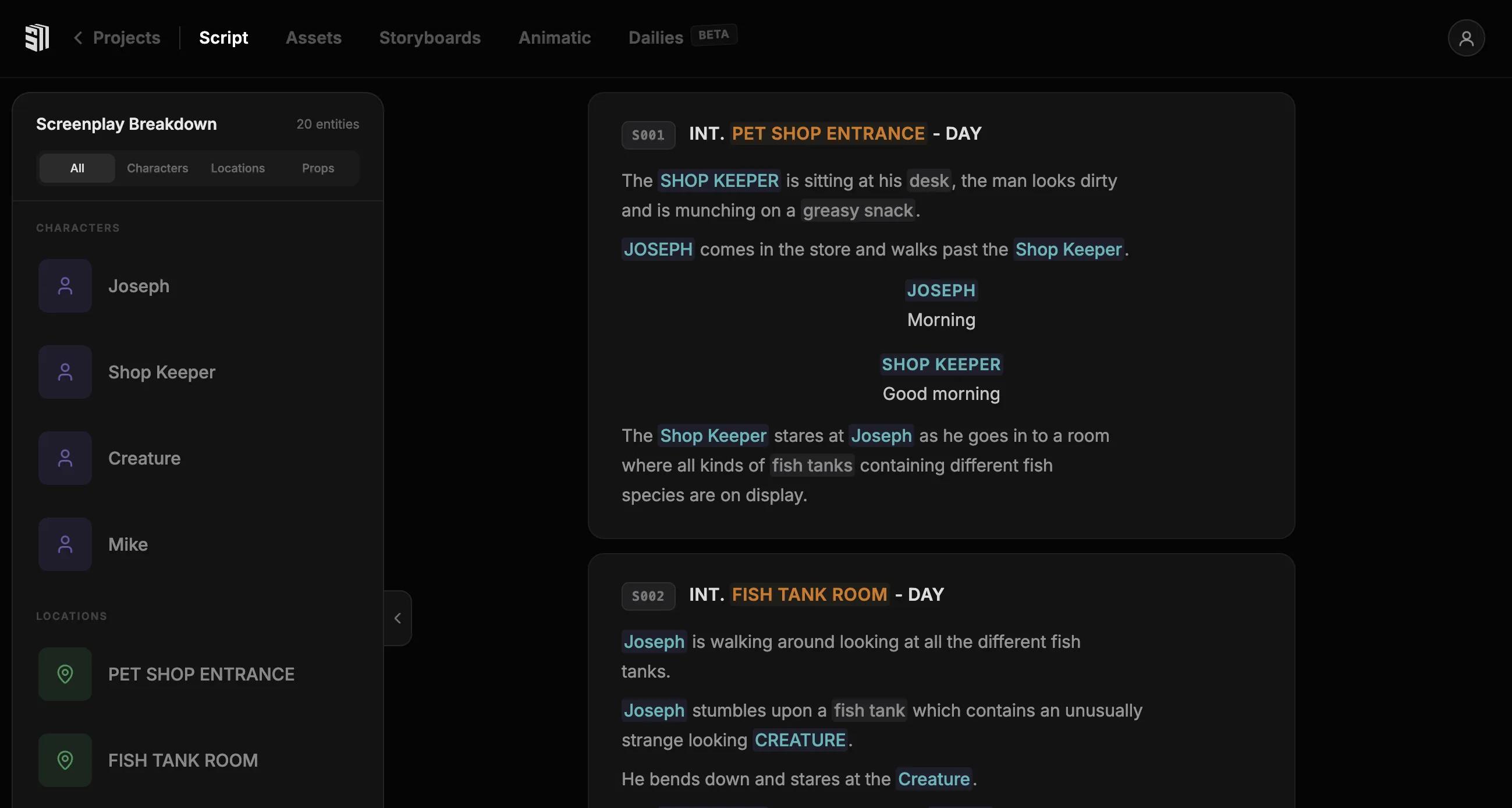
A traditional script breakdown involves manually tagging every scene for locations, characters, day/night settings, props, special effects, and stunts. On a feature, that's hundreds of elements across potentially hundreds of scenes. For a solo indie filmmaker, it's days of spreadsheet work.
AI tools can now read a script and generate a structured breakdown automatically. That means:
- Scene-by-scene summaries with tagged elements
- Location groupings that show you where scenes can be batched for efficient shooting days
- Character breakdowns showing which actors are needed in each scene
- A prop and costume inventory derived directly from script descriptions
The human review pass still matters — AI won't catch a metaphorical reference to a specific prop the way a seasoned AD would — but it handles the 80% of mechanical tagging work in minutes rather than days.
Practical tip: After running an AI breakdown, go through it scene by scene and flag anything that needs a production note. The AI speeds up the first pass; you bring the context it lacks.
AI Storyboarding and Visual Planning
Storyboarding has always been one of the highest-value pre-production activities for indie filmmakers. A good board tells the whole crew what you're trying to achieve, reduces miscommunication on set, and forces you to solve visual problems before they become expensive shooting-day surprises.
The problem: most indie filmmakers can't draw, don't have a storyboard artist in their budget, and don't have time to spend days in Photoshop.
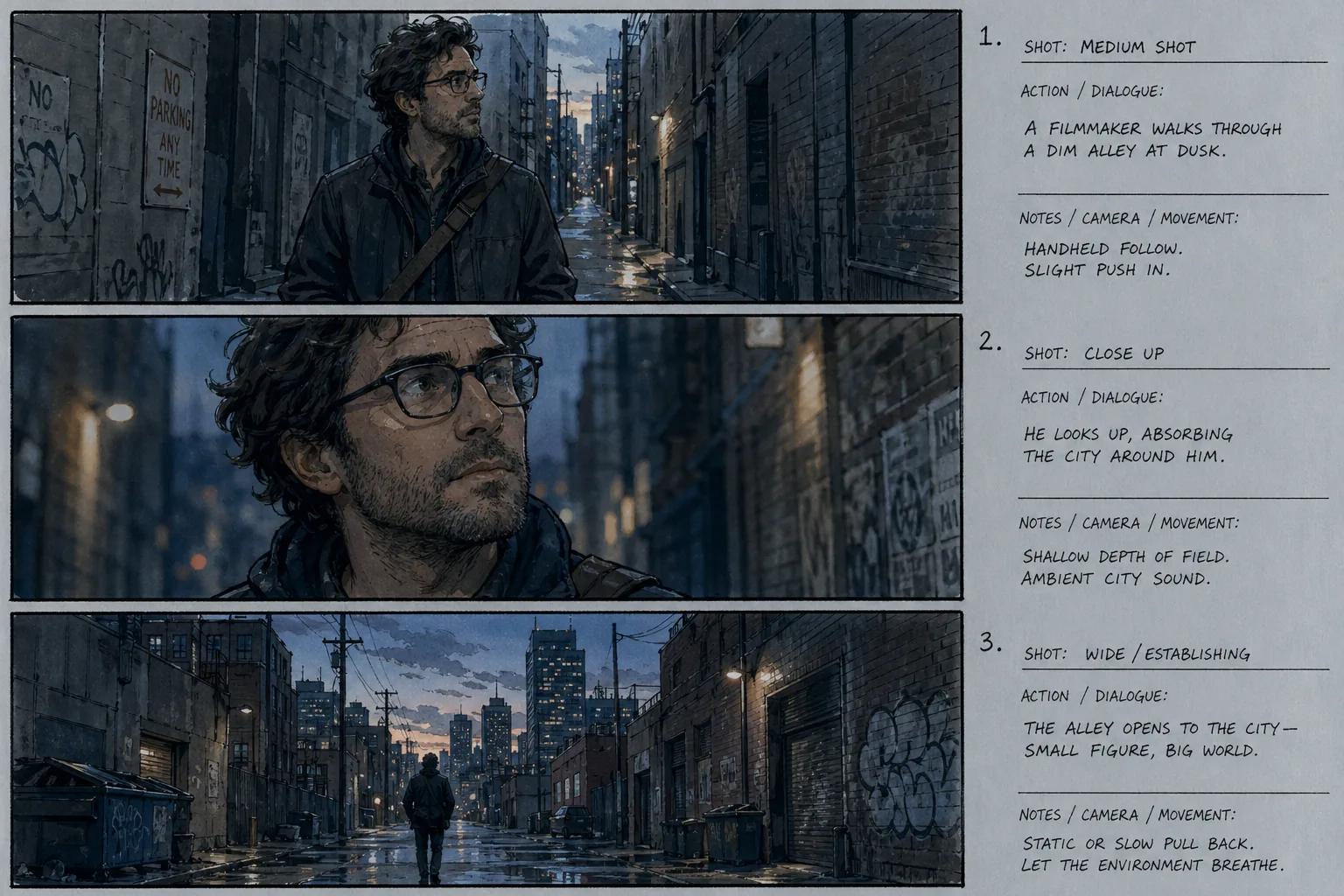
AI storyboarding changes the equation. Instead of drawing frames, you describe them — and the AI generates visual references that communicate composition, angle, mood, and character blocking. They won't be polished illustrations, but they don't need to be. They need to be clear enough that you know what you're going for, and good enough to share with a DP or actor.
For platforms like Storytella.ai, this goes a step further: the AI can generate actual cinematic scene renders directly from your script descriptions, with character consistency maintained across scenes. That means your storyboard frames look like the film you're actually trying to make, not generic AI art.
What to include in each storyboard frame:
- Shot type (wide, medium, close-up, extreme close-up)
- Camera angle (eye-level, low, high, POV)
- Character position and action
- Key background or environment details
- Any camera movement (pan, dolly, handheld)
The more specific your description, the more useful the AI output. Vague in, vague out.
Shot Planning and Scene Design
A storyboard tells you what you want. A shot list tells you how you're going to get it. AI can help bridge the two.
Once your storyboards exist, AI tools can:
- Generate a shot list from storyboard descriptions, including shot type, lens suggestion, and camera movement
- Identify coverage gaps — scenes where you have a master but no cutaways, or dialogue scenes without reverse angles
- Suggest visual approaches based on genre, tone, and the emotional beat of the scene
This isn't about letting AI choose how you shoot your film. It's about using AI to do a first-pass audit of your plan so you're not discovering a coverage problem on the day.
For indie filmmakers shooting with small crews and limited setups, catching those gaps in pre-production — rather than in the edit — is the difference between a clean cut and a scene held together with pickups you had to beg for.
Scene design checklist to run with AI assistance:
- Does every dialogue scene have both-direction coverage?
- Does every key emotional beat have a close-up available?
- Are establishing shots planned for every new location?
- Are transitions between scenes visually motivated?
Scheduling and Budgeting with AI Assistance
Scheduling and budgeting are where pre-production becomes production planning — and they're often where solo indie filmmakers feel the most out of their depth.
A traditional production schedule is built by grouping scenes by location, then by day/night, then by cast availability. An AI assistant can do that first-pass grouping automatically once it has your breakdown data, giving you a draft schedule that's logical and location-efficient.
That schedule then feeds your budget estimate. AI tools can flag:
- Locations that require significant travel or permitting
- Scenes with complex elements (stunts, effects, large extras) that typically require additional prep days
- Cast days per character so you can sequence around actor availability
The resulting estimate won't be your final budget — you still need to call vendors, check rates, and apply your local realities — but it gives you a grounded starting point instead of a blank spreadsheet.
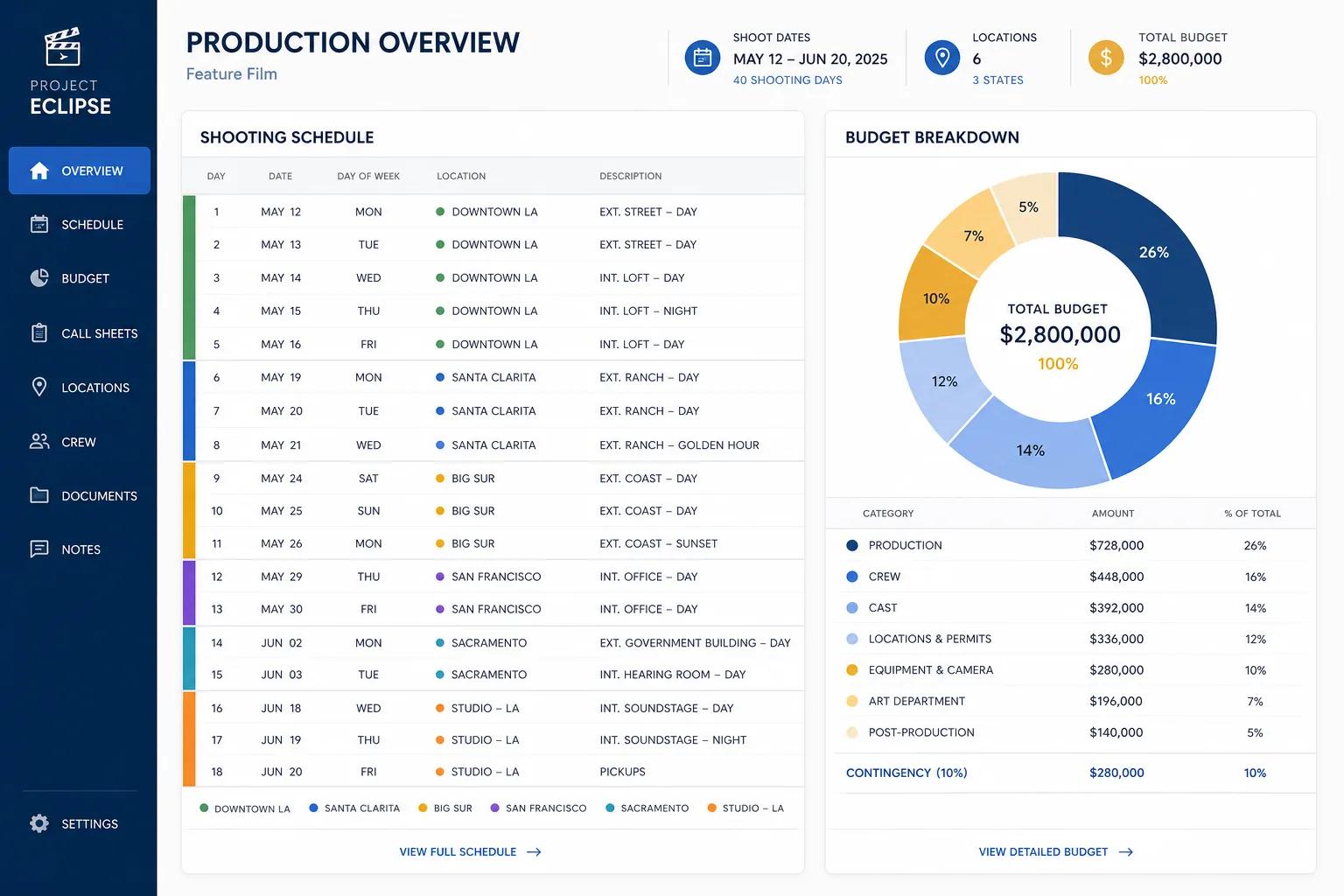
Putting It Together: A Modern Indie Pre-Production Workflow
Here's what a practical AI pre-production workflow looks like end to end:
- Write or import your script — AI analyzes it for scenes, characters, locations, and elements
- Run the breakdown — review the auto-generated breakdown and add production notes
- Generate storyboards — describe key scenes and generate visual frames; refine the ones that matter most
- Build your shot list — use AI to generate from storyboards; audit for coverage gaps
- Create a draft schedule — let AI group scenes by location and complexity; adjust for cast and crew constraints
- Estimate the budget — use the schedule to flag cost drivers; build your actual line-item budget from there
- Brief your team — share the storyboards, shot list, and schedule so everyone shows up prepared
Storytella.ai supports this entire arc in one environment — from script to visual scene generation to final cut. That matters for solo filmmakers because every time you switch tools, you lose time and introduce friction. A unified workflow keeps the creative momentum going.
FAQ
What is AI pre-production?
AI pre-production refers to using artificial intelligence tools to handle time-consuming prep tasks like script breakdown, storyboarding, shot planning, scheduling, and budgeting. The AI does the mechanical, structural work faster — the filmmaker still makes the creative decisions.
Can AI really generate usable storyboards?
Yes, for practical working purposes. AI-generated storyboards won't be gallery-quality illustration, but they communicate composition, angle, and character blocking well enough to direct from and share with crew. For platforms like Storytella.ai that generate cinematic scene renders, the visual quality goes considerably further.
Do I still need a script breakdown if I'm shooting a small indie film?
Yes — even for small projects, a proper breakdown prevents costly surprises. AI makes it fast enough that there's no excuse to skip it. An hour of breakdown prep can save a full day of shooting problems.
How accurate are AI budget estimates?
AI can give you a reasonable order-of-magnitude estimate based on scene complexity, location types, and cast requirements. It's a starting point, not a final number. You'll still need to validate against real vendor quotes and your specific geography.
Can I use AI pre-production tools if I have no filmmaking experience?
Absolutely. AI pre-production tools are often more accessible to beginners than traditional methods because they provide structure and guidance that experienced filmmakers carry in their heads. If you're starting from scratch, Storytella.ai is designed to walk you through the entire filmmaking process — including pre-production — without assuming prior knowledge.
How much does AI pre-production change the creative process?
It doesn't change what you're creating — it changes how fast you can prepare to create it. Your story, your characters, your visual language: those are still yours. AI just eliminates the weeks of administrative prep that used to stand between the script and the shoot.
What's the biggest mistake indie filmmakers make in pre-production?
Skipping it, or rushing it. The pressure to get to set is real, but under-prepared productions almost always take longer and cost more in the end. AI makes thorough pre-production realistic for solo filmmakers who previously couldn't afford the time it took.
Conclusion
Pre-production has always been the unsexy part of filmmaking — the weeks of prep work that nobody talks about but everyone depends on. For indie filmmakers working alone or with tiny teams, it's also been one of the biggest obstacles between having a script and actually being able to shoot it.
AI pre-production tools don't make that work disappear. They make it fast enough that one person can actually do it well. Script breakdowns in minutes. Storyboards from descriptions. Shot lists from storyboards. Draft schedules and rough budgets from the breakdown data. Every step moves faster, and the work you used to need a department head for can now happen on your laptop the night before your location scout.
The creative work — the story, the performances, the visual choices — that's still yours. AI handles the structural prep so you can spend your energy on the parts that actually end up on screen.
Try Storytella.ai and take your project from script through pre-production to final cut — no crew required.
Your story awaits
The set is ready for you.
Turn your screenplay into stunning storyboards and animatics in minutes — not months. No drawing skills required.
Free to start · No credit card required · Cancel anytime