 Storytella
From Screenplay to Cinematic Trailer in One Weekend
A weekend-long workflow for turning the script in your drafts folder into a real, watchable trailer — without a crew, a budget, or another six-month delay.
You don't need a crew, a studio, or six more months to find out whether your script has a trailer in it. With the right workflow and an AI filmmaking platform built for end-to-end production, you can take a finished screenplay and walk away on Sunday night with a cinematic AI movie trailer you'd actually show someone. This guide is the weekend-by-weekend version: what to do Friday, Saturday, and Sunday — what beats to hit, what to generate, and the small mistakes that quietly cost the most time.
Why a Trailer Is the Right First Step
A feature is a marathon. A trailer is a sprint that proves you can run.
For most indie filmmakers and creators, the first AI film project should be a 60- to 90-second trailer — not a short film, not a pilot. A trailer forces you to decide what the story is actually about before you spend three weekends producing scenes you'll never use. It's the smallest version of your film that can still feel like a film.
It's also the perfect length for an AI movie trailer specifically. AI scene generation works best in short, controlled bursts where character consistency, lighting, and style can stay locked. A trailer is exactly that: a curated handful of scenes engineered to land an emotional punch.
What You'll Need Before Friday Night
Open your laptop with these four things ready:
- A finished screenplay or treatment. Even 10 pages is enough. You don't need the whole feature — you just need a story you understand well enough to cut a teaser from.
- A logline. One sentence. If you can't write the logline, you can't cut the trailer.
- Reference trailers. Pick two trailers from films you love and watch them with the sound off. Notice how few shots they use.
- An AI filmmaking platform. You want one tool that handles script-to-scene, character consistency, style control, and editing — not five tools you have to glue together. Storytella.ai is built for this end-to-end workflow.
If your weekend has a hole in it before you start, it's almost always because one of these four pieces was missing.
Friday Night: Lock the Story Beats
Resist the urge to start generating images. Friday is for words, not visuals.
Pull out a single page and answer five questions:
- What world are we in? (Place, era, tone — one line.)
- Who is the main character, and what do they want?
- What's standing in their way?
- What's the moment of no return?
- What's the question we leave the audience with?
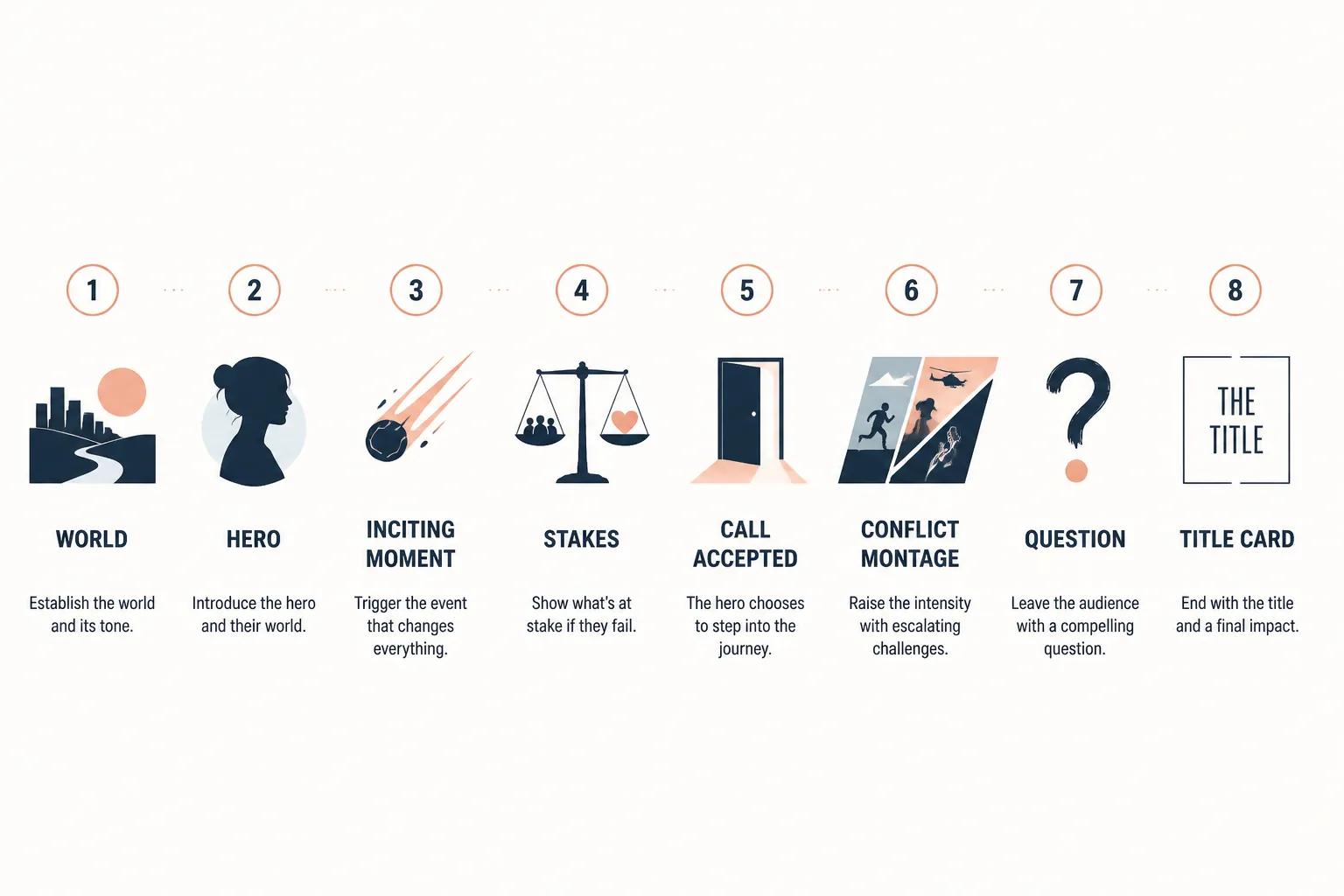
Now sketch your trailer in 6–8 beats. A good cinematic AI trailer rarely needs more.
A simple beat skeleton:
1. World establishing — quiet, beautiful, unsettling
2. Hero in their normal life
3. The inciting moment
4. Stakes raise — the antagonist or threat
5. Hero accepts the call
6. Montage of conflict
7. Question or threat — the trailer "drop"
8. Title card
Write one sentence per beat describing the image you want — not just the action. "A girl looks up as the lights cut out" is a shot. "She realizes she's not alone" is a scene description. You want shots.
This page is your shot list. Saturday is going to feel chaotic without it.
Saturday: Generate Scenes and Build the Cut
Saturday is production day. The goal: by dinner, every beat from your shot list has a generated scene attached. By bedtime, you have a rough cut.
Step 1 — Set your style once. Decide on a visual style (e.g., "cinematic 35mm, muted teal-and-amber palette, slight haze, naturalistic lighting") and apply it across the project. Style drift between scenes is the single biggest tell that something was made fast. Platforms like Storytella apply style controls across the whole production, so you set this once and it carries through every scene.
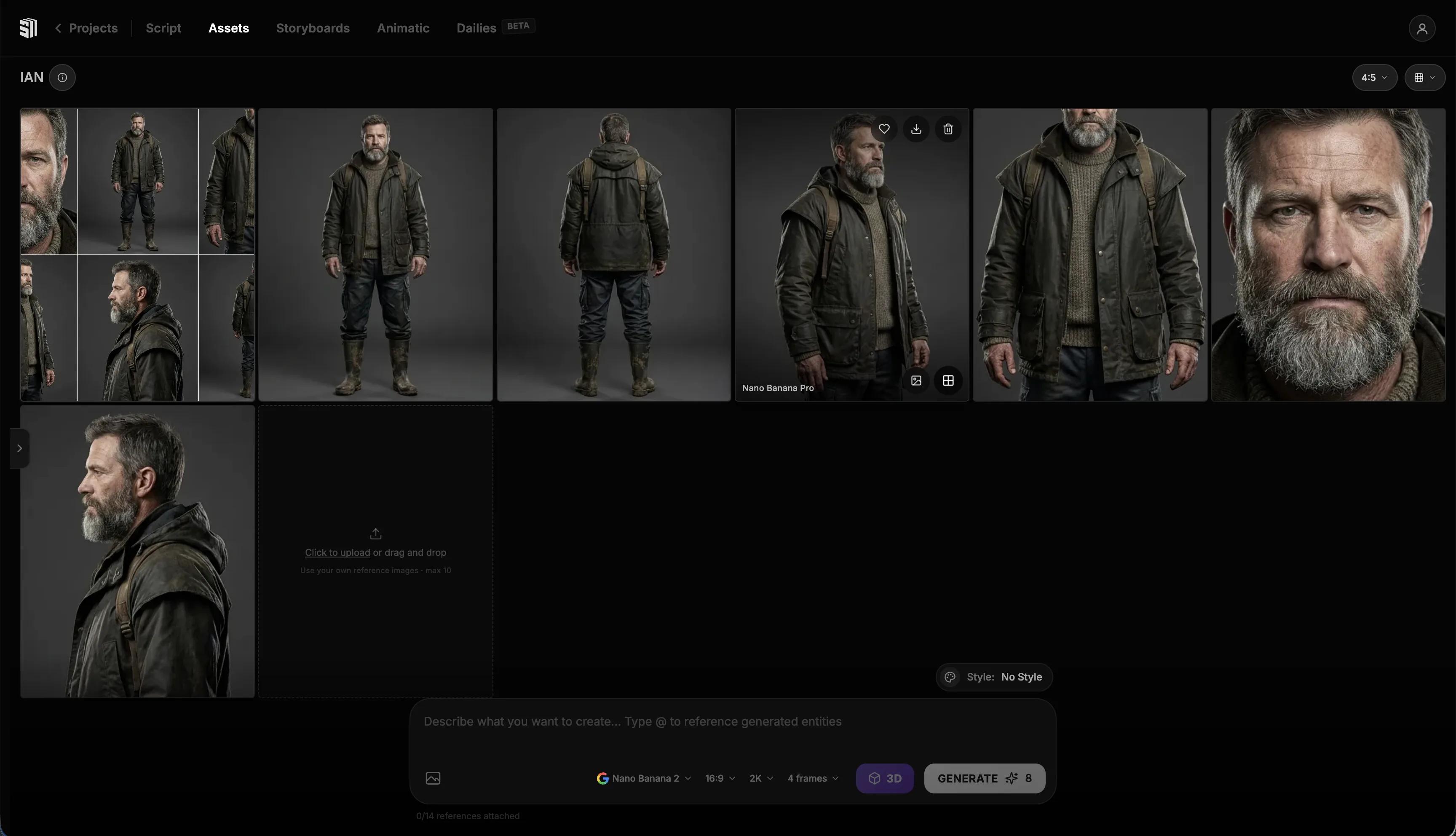
Step 2 — Lock your characters. Generate the hero and any supporting cast first. Get a clean reference for each — face, wardrobe, posture. Save them as character anchors so they stay consistent across every scene you generate. Character consistency is the difference between a trailer and a slideshow.
Step 3 — Generate scene by scene, in order. Don't jump around. Start with beat 1 and work down your shot list. For each beat, write a scene prompt with three layers:
- Action: what's happening in the frame
- Emotion: what the audience should feel
- Camera: angle, framing, movement (e.g., "slow push-in," "low-angle wide")
If a generated scene isn't right, regenerate. Iteration is the whole point — you're not reshooting, you're refining. Aim for 2–3 takes per beat, then move on.
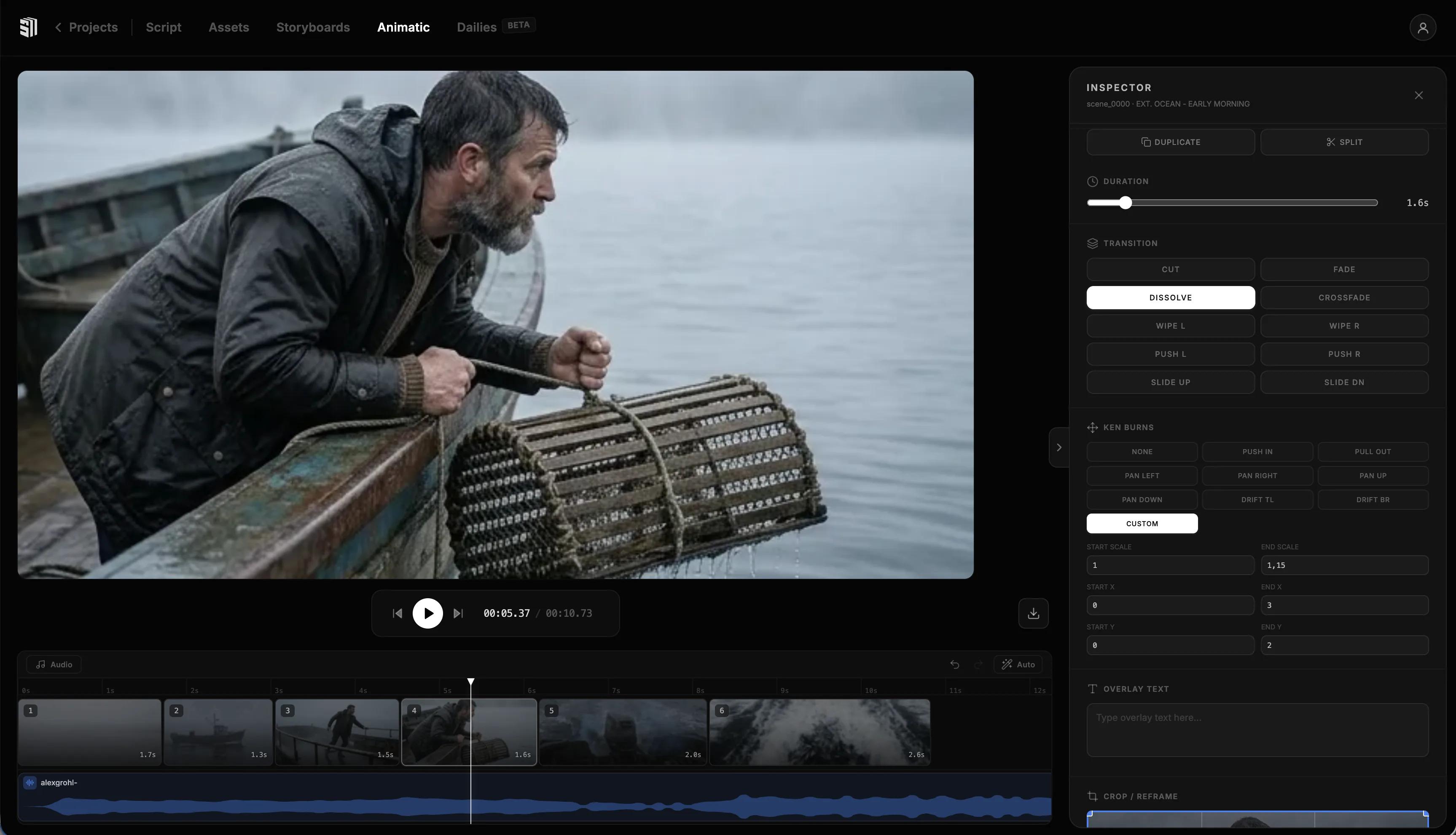
Step 4 — Drop everything onto the timeline. Don't polish yet. Get every beat on the timeline in order, even if rough. You want to see the shape of the trailer.
Step 5 — Cut to the bone. Watch it back. Cut anything that doesn't earn its place. A 90-second trailer with 12 great shots beats a 90-second trailer with 25 okay ones.
By Saturday night you should have a silent rough cut you'd be willing to show a friend. Tomorrow you make it sing.
Sunday: Sound, Music, and Final Polish
Sunday is the day a rough cut becomes a trailer.
Add music first. Music sets pace. Pick a track that matches the emotional arc — quiet to loud, calm to chaotic — and cut your visuals to it, not the other way around. Most great trailers are edited around the music, not over it.
Layer sound design. Whooshes, low rumbles, a single piano note before the title card. AI-generated scenes lack natural ambient sound, so you have to put it back. Build atmosphere underneath every shot.
Cut in voiceover or dialogue, sparingly. One line, two lines max. Trailers that lean on dialogue almost always feel cheaper. Let the images carry the story; let one line of voiceover anchor it.
Add the title card and the question. End on a beat the audience can't answer — the question that makes them want the rest of the film.
Color and final pass. A subtle grade across the whole trailer ties everything together. Don't get fancy — consistency beats flair.
By Sunday at 9 p.m., you should have a finished AI movie trailer. Export, watch it once on your phone (that's where most people will see it), then ship it.
Common Mistakes to Avoid
A few patterns that quietly waste a weekend:
- Starting with images instead of beats. You'll generate beautiful shots that don't add up to a story. Always lock the beats first.
- Letting style drift. Different lighting, different lens, different palette across scenes — it tells the audience this isn't a real film. Set style once, lock it, never tweak it scene by scene.
- Too many shots. Trailers feel longer when they're cluttered. Cut twice as much as you think you should.
- Skipping sound. A silent trailer doesn't feel cinematic, no matter how good the images are. Sound is half the trailer.
- Endless regeneration. Two or three takes per beat is enough. If a shot still isn't working after three tries, the prompt is wrong, not the AI.
FAQ
How long should an AI movie trailer be?
The sweet spot is 60–90 seconds. Shorter teasers (15–30 seconds) work for social, but a full trailer needs room to set up a world, raise the stakes, and land a question. Anything past two minutes works against the audience's attention.
Do I need to be a filmmaker to make an AI movie trailer?
No, but you do need to be a storyteller. The platform handles production — you still write the screenplay, choose the beats, and make the cut. If you can describe scenes in clear, specific language and you understand basic story structure, you have everything you need. Tools like Storytella.ai are built specifically for creators with no filmmaking background.
What's the most important thing for character consistency?
Lock your character early and reference them in every scene generation. Generate a clean character anchor with face, wardrobe, and lighting locked, then carry that anchor through every beat. Most consistency problems come from generating each scene from scratch instead of referencing the established character.
Can I really finish a cinematic trailer in one weekend?
Yes — if your script and beats are ready before Friday night. The weekend is for production, not for figuring out what the story is. Most filmmakers who fail this challenge fail because they tried to write the screenplay and cut the trailer in the same weekend.
What kind of script works best for an AI movie trailer?
Stories with strong visual hooks — sci-fi, fantasy, horror, dramatic thrillers — translate fastest because their tension is visible. Quiet character dramas can work, but they demand more nuance from your prompts. Pick a script with a clear world, a clear stakes ladder, and a clear question you can leave hanging.
Should I use real footage or stick with AI-generated scenes?
For a first weekend project, stick with fully AI-generated scenes. Mixing real and AI footage requires careful color and grain matching that can eat hours. Once you've shipped one trailer, you'll have the instincts to blend formats on the next one.
Conclusion
A weekend isn't enough time to make a feature. It's plenty of time to prove your script deserves one.
A great AI movie trailer is built the same way a traditional one is — beats first, then production, then sound and polish. The difference is that you can ship it on Sunday night instead of next year. Lock the story Friday, generate scenes Saturday, finish sound and cut Sunday. That's the whole game.
The platform you choose matters too. End-to-end tools beat stitched-together workflows because consistency is the entire point — characters, style, and tone need to hold across every shot for a trailer to feel like a film instead of a slideshow.
Try Storytella.ai and turn this weekend's screenplay into next weekend's trailer — script to final cut, no crew required.
Your story awaits
The set is ready for you.
Turn your screenplay into stunning storyboards and animatics in minutes — not months. No drawing skills required.
Free to start · No credit card required · Cancel anytime