 Storytella
AI Animation 2026: From Storyboard Frames to a Moving Pre-Vis
The gap between a flat storyboard and a real pre-vis used to take a team. In 2026, AI animation closes that gap — here's the workflow that actually works.
If you've ever finished a storyboard and felt the project stall, you already know the problem. The frames look great pinned to a wall, but they don't move, they don't have timing, and they don't tell you whether the scene actually works. Building a proper pre-vis used to mean hiring an animator, blocking it in 3D, or shooting reference yourself. That's where most indie projects quietly died.
That gap has closed. With Storytella.ai and the new generation of AI animation tools, you can turn a stack of storyboard frames into a moving pre-vis in an afternoon — and you can iterate on it as many times as the cut needs.
This guide walks through what AI animation actually means in 2026, how the storyboard-to-pre-vis workflow runs end to end, what to look for in a platform, and the mistakes that quietly waste days.
What AI Animation Means in 2026
AI animation in 2026 is not the frame-interpolation novelty of a few years ago. It is generative motion — a model takes your visual references, your shot intent, and your prompt, and produces a video shot that obeys all three.
The shift matters because it changes who can use it. A solo creator can now produce a moving pre-vis that respects character design, camera intent, and scene continuity, without rigging, without keyframing, and without an animation seat.
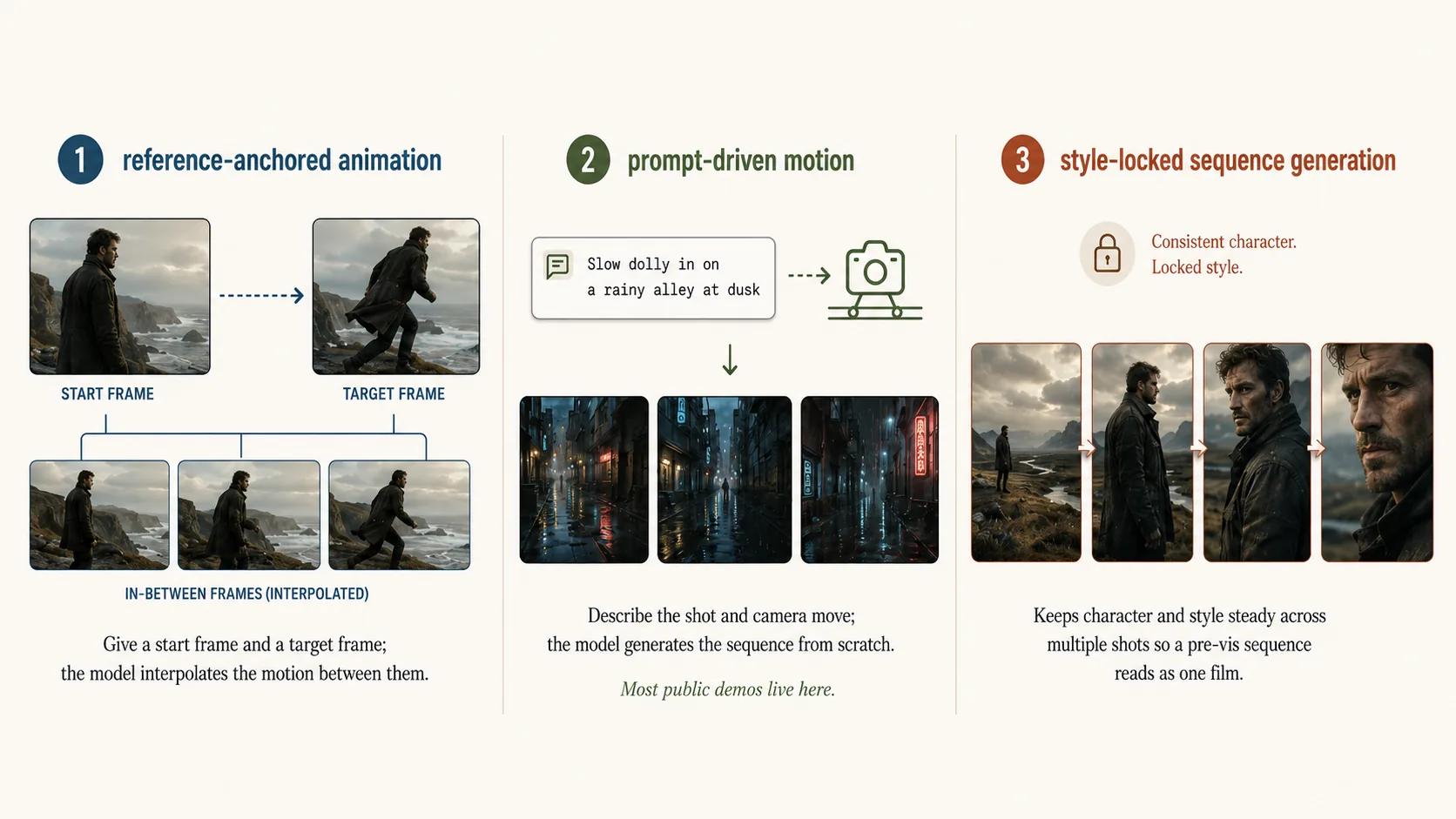
There are roughly three flavors of AI animation in use right now:
- Reference-anchored animation — you give the model a starting frame and a target frame, and it fills the motion between them.
- Prompt-driven motion — you describe the shot and the camera move, and the model generates the sequence from scratch.
- Style-locked sequence generation — the model holds character and style steady across multiple shots so a whole pre-vis sequence reads as one film.
For pre-vis work, the first and third matter most. The second is where most of the public demos live, but it's the least useful for serious filmmaking, because pre-vis is a planning artifact — it needs to match a plan, not invent one.
The Pre-Vis Problem Before AI
For decades, pre-visualization was the privilege of studios with budget. The reasons were practical, not creative.
A traditional pre-vis pipeline meant rough 3D models, a layout artist, a camera animator, and at minimum a basic lighting pass — enough that a director could see the shot move and adjust before the real shoot. That's weeks of work for one scene.
Indie directors and content creators usually handled this in one of three ways:
- They drew a storyboard, called it done, and hoped the timing worked on set.
- They shot reference video themselves, which only worked if the camera moves were simple.
- They skipped pre-vis entirely and figured it out in production, which is where most budget overruns are born.
The result was a quiet two-tier system. Big projects got to see their movie before they shot it. Small projects shot blind. AI animation breaks that tier because the cost of seeing your movie early dropped from "an animator's monthly retainer" to "a few hours and a platform subscription."
How AI Animation Bridges Storyboard to Pre-Vis
The bridge from a storyboard frame to a moving shot has three parts: anchors, intent, and continuity.
Anchors. Your storyboard frames are not throwaway sketches anymore. They're reference frames that an AI animation model uses to lock the look of the shot — the composition, the character placement, the framing. Feed the start frame and, where you have one, an end frame. The model treats them as constraints, not suggestions.
Intent. Storyboards have always carried intent in the form of arrows and notes — dolly in, push left, character exits frame right. In 2026, you write that intent as a short prompt. The model reads "slow dolly in on the character, hold focus, slight handheld feel" and respects it.
Continuity. This is the part that broke earlier AI video — your character looked like a different person every shot. Modern AI animation platforms hold a character reference across shots so the entire pre-vis sequence reads as one film. Style control does the same thing for the visual world.
When all three line up, the output is no longer a clever clip — it's a piece of the cut.
The Workflow: From Frames to a Moving Pre-Vis
Here is the workflow that consistently works for indie filmmakers and content creators in 2026. It assumes you already have a script and a basic storyboard.
Step 1: Lock your storyboard frames as anchors
Pick the frames that define each shot — usually the first and last frame for shots with motion, or a single frame for shots that are mostly static. Clean them up enough that the model can read them. Rough pencil works; chaotic squiggles don't.
Step 2: Define shot intent for every shot
For each shot, write one or two sentences that describe the camera move, the action, the pacing, and the mood. Keep it short and concrete. "Slow push in, character lifts the photograph, beat of recognition" is better than three paragraphs.
Step 3: Generate motion between anchors
Feed the anchors and intent into your AI animation platform. Generate the shot. Watch it once. If the motion is wrong, adjust the intent prompt — not the anchors — and regenerate. Most shots land in two to four passes.
Step 4: Stitch shots into a sequence with a scratch audio track
Drop your generated shots into a sequence. Add a scratch dialogue read or temp music. This is the moment pre-vis becomes useful — you can see whether the scene's timing actually works.
Step 5: Review timing, iterate, lock the pre-vis
Watch the sequence as a scene, not as a series of shots. Where the timing drags, regenerate a shorter version. Where it rushes, regenerate longer. The whole point of doing this in AI is that iteration is cheap.
What to Look for in an AI Animation Platform
Not every platform that calls itself "AI animation" is set up for pre-vis work. The features that actually matter:
Character consistency across shots. If your protagonist looks like a different person in shot four than they did in shot one, your pre-vis is useless for blocking decisions. Platforms that hold a character reference across a project are non-negotiable for sequence work.
Style control applied to the whole project. Pre-vis needs to read as one film, not a mood-board collage. Look for a single style setting that propagates across every shot you generate.
A real camera-control language. "Dolly in," "pan right," "static wide," "handheld" — the platform should understand camera intent without you stitching together three workarounds.
Length and pacing control per shot. Pre-vis is timing. You need to be able to ask for a four-second shot and get a four-second shot.
Sequence assembly in the same environment. If you have to export every shot, drop them into a separate editor, and conform them by hand, you lose the iteration speed that makes AI pre-vis worth doing. Platforms like Storytella.ai are built around the script-to-sequence loop for exactly this reason.
Honest output quality. Pre-vis doesn't need to look like the final film. It needs to be readable. Beware platforms that optimize for show-reel beauty over the kind of grounded, consistent output that's actually useful for planning.
Common Mistakes to Avoid
A few traps come up over and over for people running this workflow for the first time.
Treating the pre-vis like the final film. It isn't. Pre-vis is a planning document. If you spend three days polishing one shot, you've missed the point.
Skipping the storyboard step. AI animation tools work best with anchor frames. Going straight from script to generated shot strips out the intent layer and you get clips, not a cut.
Asking for too much motion in one shot. Single shots that try to do five things at once tend to break. Keep each shot doing one thing, the way real cinematography does.
Ignoring continuity until the end. Style and character drift compound fast. Lock those settings before you generate, not after.
Using pre-vis as a replacement for production. It isn't that either. The point of pre-vis is to make production better, not to skip it.
FAQ
What's the difference between AI animation and AI video generation?
AI video generation is the broader category — any model that produces video from prompts, references, or both. AI animation specifically refers to motion generation between or around defined visual references, which is what makes it useful for pre-vis. In practice the same modern platforms can do both, but the mode you reach for depends on what you're trying to plan.
Can I make a pre-vis without an animator?
Yes — that's exactly what changed. A solo creator with a storyboard and a clear sense of shot intent can build a usable pre-vis sequence in an afternoon using an AI animation platform like Storytella.ai, without any traditional animation skill.
How long does an AI pre-vis actually take?
For a short scene of six to ten shots, expect two to four hours including iteration. A full short film pre-vis can run a day or two. The bottleneck is almost always your storyboard and intent prep, not the generation time.
Will AI replace pre-vis artists?
For big studios, no — large productions still benefit from dedicated layout and pre-vis teams who do far more than generate shots. For indie filmmakers and content creators who never had access to pre-vis at all, AI animation isn't replacing anyone. It's giving them a tool that didn't exist for them.
How do you maintain character consistency across an AI pre-vis?
Use a platform with character reference support — you lock a single character look once, and every shot you generate references it. Avoid platforms that ask you to re-prompt the character description in every shot. That approach drifts fast and breaks scene continuity.
Is AI pre-vis good enough for client work?
For pitching, concept review, and internal planning, yes. Clients respond to motion in a way they don't respond to storyboards. Just be clear with them that what they're watching is a planning tool, not a finished piece — manage the expectation up front.
Conclusion
AI animation in 2026 isn't about making finished films at the click of a button. The most useful thing it actually does is close the gap between a static storyboard and a moving pre-vis — the gap that, for most indie filmmakers and content creators, used to mean the project stalled.
If you treat AI animation as a planning tool, anchor it to a real storyboard, write clear shot intent, and iterate, you get something genuinely new. A pre-vis you can actually watch, share, and cut with — built by one person, in an afternoon.
The shift isn't just speed. It's access. Filmmakers who never had the budget for a real pre-vis pipeline now have one. That changes which films get made.
Try Storytella.ai and turn your storyboard into a moving pre-vis today — no crew, no animator, no waiting.
Your story awaits
The set is ready for you.
Turn your screenplay into stunning storyboards and animatics in minutes — not months. No drawing skills required.
Free to start · No credit card required · Cancel anytime